 ## Guide
- [Starting the App/Bot](#starting-the-appbot)
- [Changing Env Configuration](https://github.com/HirziDevs/PteroStats/blob/main/guide/changing-env-configuration.md)
- [Getting an Panel API key](https://github.com/HirziDevs/PteroStats/blob/main/guide/getting-panel-api-key.md)
- [Getting a Channel ID](https://github.com/HirziDevs/PteroStats/blob/main/guide/getting-channel-id.md)
- [Using Custom Emoji](https://github.com/HirziDevs/PteroStats/blob/main/guide/using-custom-emoji.md)
- [Blacklist Nodes](https://github.com/HirziDevs/PteroStats/blob/main/guide/blacklist-specific-nodes.md)
- [Notifier](https://github.com/HirziDevs/PteroStats/blob/main/guide/notifier.md)
- [Docker](https://github.com/HirziDevs/PteroStats/blob/main/guide/docker.md)
### Starting the App/Bot
1. [Create your Discord App/Bot](https://discordjs.guide/preparations/adding-your-bot-to-servers.html).
2. [Invite your Discord App/Bot to your Discord server](https://discordjs.guide/preparations/adding-your-bot-to-servers.html).
3. Download this repository:
- Manually: [Download this repository](https://github.com/HirziDevs/PteroStats/archive/refs/heads/main.zip) and extract it.
- Using Git: Run `git clone https://github.com/HirziDevs/PteroStats.git` in the command line.
4. Run `npm install` in the root directory of the app/bot files.
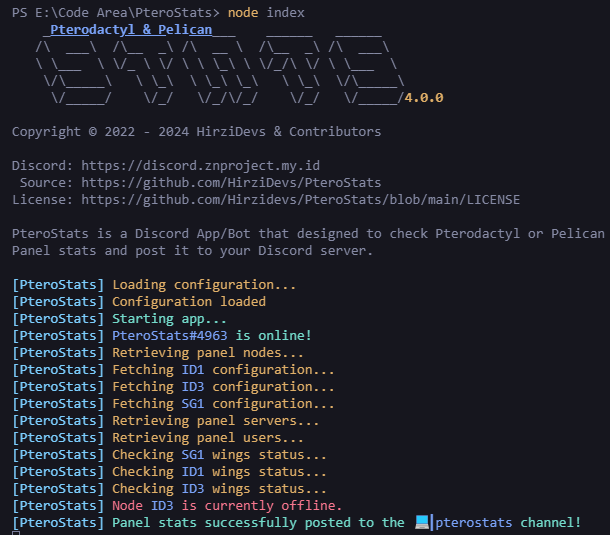
5. Run `node index.js` and answer the prompted questions to set up the app/bot.
## Guide
- [Starting the App/Bot](#starting-the-appbot)
- [Changing Env Configuration](https://github.com/HirziDevs/PteroStats/blob/main/guide/changing-env-configuration.md)
- [Getting an Panel API key](https://github.com/HirziDevs/PteroStats/blob/main/guide/getting-panel-api-key.md)
- [Getting a Channel ID](https://github.com/HirziDevs/PteroStats/blob/main/guide/getting-channel-id.md)
- [Using Custom Emoji](https://github.com/HirziDevs/PteroStats/blob/main/guide/using-custom-emoji.md)
- [Blacklist Nodes](https://github.com/HirziDevs/PteroStats/blob/main/guide/blacklist-specific-nodes.md)
- [Notifier](https://github.com/HirziDevs/PteroStats/blob/main/guide/notifier.md)
- [Docker](https://github.com/HirziDevs/PteroStats/blob/main/guide/docker.md)
### Starting the App/Bot
1. [Create your Discord App/Bot](https://discordjs.guide/preparations/adding-your-bot-to-servers.html).
2. [Invite your Discord App/Bot to your Discord server](https://discordjs.guide/preparations/adding-your-bot-to-servers.html).
3. Download this repository:
- Manually: [Download this repository](https://github.com/HirziDevs/PteroStats/archive/refs/heads/main.zip) and extract it.
- Using Git: Run `git clone https://github.com/HirziDevs/PteroStats.git` in the command line.
4. Run `npm install` in the root directory of the app/bot files.
5. Run `node index.js` and answer the prompted questions to set up the app/bot.
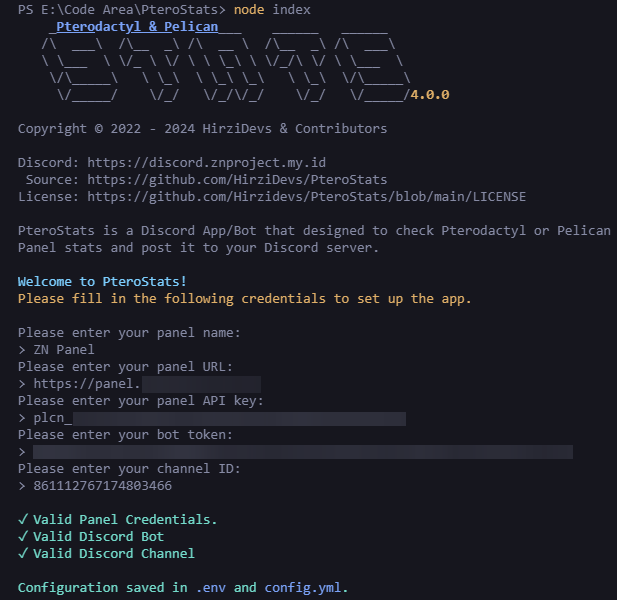 - [Getting an Panel API key](https://github.com/HirziDevs/PteroStats/blob/main/guide/getting-panel-api-key.md)
- [Getting a Channel ID](https://github.com/HirziDevs/PteroStats/blob/main/guide/getting-channel-id.md)
6. Run `node index.js` if you want to start the app/bot again, and you're done!
## Reporting a Bug
Enable `log_error` in the `config.yml` file and check the console for the error message. After that, report it to our Discord server at [Support Server](https://discord.znproject.my.id).
## Links
- [Pterodactyl Discord Server](https://discord.gg/pterodactyl)
- [Pelican Discord Server](https://discord.gg/pelican-panel)
- [Support Server](https://discord.znproject.my.id)
- [Getting an Panel API key](https://github.com/HirziDevs/PteroStats/blob/main/guide/getting-panel-api-key.md)
- [Getting a Channel ID](https://github.com/HirziDevs/PteroStats/blob/main/guide/getting-channel-id.md)
6. Run `node index.js` if you want to start the app/bot again, and you're done!
## Reporting a Bug
Enable `log_error` in the `config.yml` file and check the console for the error message. After that, report it to our Discord server at [Support Server](https://discord.znproject.my.id).
## Links
- [Pterodactyl Discord Server](https://discord.gg/pterodactyl)
- [Pelican Discord Server](https://discord.gg/pelican-panel)
- [Support Server](https://discord.znproject.my.id)