 c973254362
ICS is a compaction strategy that inherits size tiered properties --
therefore it's write optimized too -- but fixes its space overhead of
100% due to input files being only released on completion. That's
achieved with the concept of sstable run (similar in concept to LCS
levels) which breaks a large sstable into fixed-size chunks (1G by
default), known as run fragments. ICS picks similar-sized runs
for compaction, and fragments of those runs can be released
incrementally as they're compacted, reducing the space overhead
to about (number_of_input_runs * 1G). This allows user to increase
storage density of nodes (from 50% to ~80%), reducing the cost of
ownership.

NOTE: test_system_schema_version_is_stable adjusted to account for batchlog
using IncrementalCompactionStrategy

contains:

compaction/: added incremental_compaction_strategy.cc (.hh), incremental_backlog_tracker.cc (.hh)
compaction/CMakeLists.txt: include ICS cc files
configure.py: changes for ICS files, includes test
db/legacy_schema_migrator.cc / db/schema_tables.cc: fallback to ICS when strategy is not supported
db/system_keyspace: pick ICS for some system tables
schema/schema.hh: ICS becomes default
test/boost: Add incremental_compaction_test.cc
test/boost/sstable_compaction_test.cc: ICS related changes
test/cqlpy/test_compaction_strategy_validation.py: ICS related changes

docs/architecture/compaction/compaction-strategies.rst: changes to ICS section
docs/cql/compaction.rst: changes to ICS section
docs/cql/ddl.rst: adds reference to ICS options
docs/getting-started/system-requirements.rst: updates sentence mentioning ICS
docs/kb/compaction.rst: changes to ICS section
docs/kb/garbage-collection-ics.rst: add file
docs/kb/index.rst: add reference to <garbage-collection-ics>
docs/operating-scylla/procedures/tips/production-readiness.rst: add ICS section

some relevant commits throughout the ICS history:

commit 434b97699b39c570d0d849d372bf64f418e5c692
Merge: 105586f747 30250749b8
Author: Paweł Dziepak <pdziepak@scylladb.com>
Date:   Tue Mar 12 12:14:23 2019 +0000

    Merge "Introduce Incremental Compaction Strategy (ICS)" from Raphael

    "
    Introduce new compaction strategy which is essentially like size tiered
    but will work with the existing incremental compaction. Thus incremental
    compaction strategy.

    It works like size tiered, but each element composing a tier is a sstable
    run, meaning that the compaction strategy will look for N similar-sized
    sstable runs to compact, not just individual sstables.

    Parameters:
    * "sstable_size_in_mb": defines the maximum sstable (fragment) size
    composing
    a sstable run, which impacts directly the disk space requirement which is
    improved with incremental compaction.
    The lower the value the lower the space requirement for compaction because
    fragments involved will be released more frequently.
    * all others available in size tiered compaction strategy

    HOWTO
    =====

    To change an existing table to use it, do:
         ALTER TABLE mykeyspace.mytable  WITH compaction =
    {'class' : 'IncrementalCompactionStrategy'};

    Set fragment size:
         ALTER TABLE mykeyspace.mytable  WITH compaction =
    {'class' : 'IncrementalCompactionStrategy', 'sstable_size_in_mb' : 1000 }

    "

commit 94ef3cd29a196bedbbeb8707e20fe78a197f30a1
Merge: dca89ce7a5 e08ef3e1a3
Author: Avi Kivity <avi@scylladb.com>
Date:   Tue Sep 8 11:31:52 2020 +0300

    Merge "Add feature to limit space amplification in Incremental Compaction" from Raphael

    "
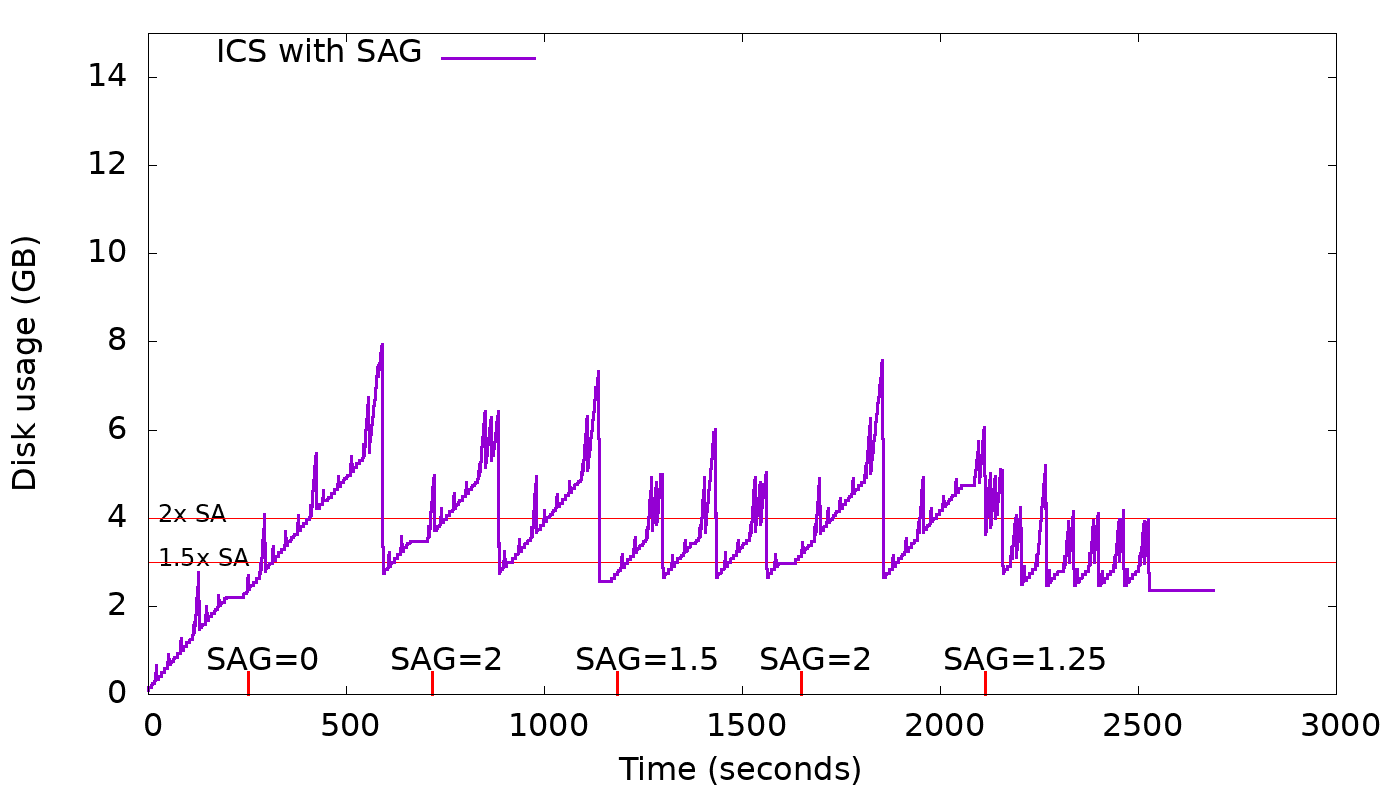
    A new option, space_amplification_goal (SAG), is being added to ICS. This option
    will allow ICS user to set a goal on the space amplification (SA). It's not
    supposed to be an upper bound on the space amplification, but rather, a goal.
    This new option will be disabled by default as it doesn't benefit write-only
    (no overwrites) workloads and could hurt severely the write performance.
    The strategy is free to delay triggering this new behavior, in order to
    increase overall compaction efficiency.

    The graph below shows how this feature works in practice for different values
    of space_amplification_goal:
    https://user-images.githubusercontent.com/1409139/89347544-60b7b980-d681-11ea-87ab-e2fdc3ecb9f0.png

    When strategy finds space amplification crossed space_amplification_goal, it
    will work on reducing the SA by doing a cross-tier compaction on the two
    largest tiers. This feature works only on the two largest tiers, because taking
    into account others, could hurt the compaction efficiency which is based on
    the fact that the more similar-sized sstables are compacted together the higher
    the compaction efficiency will be.

    With SAG enabled, min_threshold only plays an important role on the smallest
    tiers, given that the second-largest tier could be compacted into the largest
    tier for a space_amplification_goal value < 2.
    By making the options space_amplification_goal and min_threshold independent,
    user will be able to tune write amplification and space amplification, based on
    the needs. The lower the space_amplification_goal the higher the write
    amplification, but by increasing the min threshold, the write amplification
    can be decreased to a desired amount.
    "

commit 7d90911c5fb3fa891ad64a62147c3a6ca26d61b1
Author: Raphael S. Carvalho <raphaelsc@scylladb.com>
Date:   Sat Oct 16 13:41:46 2021 -0300

    compaction: ICS: Add garbage collection

    Today, ICS lacks an approach to persist expired tombstones in a timely manner,
    which is a problem because accumulation of tombstones are known to affecting
    latency considerably.

    For an expired tombstone to be purged, it has to reach the top of the LSM tree
    and hope that older overlapping data wasn't introduced at the bottom.
    The condition are there and must be satisfied to avoid data resurrection.

    STCS, today, has an inefficient garbage collection approach because it only
    picks a single sstable, which satisfies the tombstone density threshold and
    file staleness. That's a problem because overlapping data either on same tier
    or smaller tiers will prevent tombstones from being purged. Also, nothing is
    done to push the tombstones to the top of the tree, for the conditions to be
    eventually satisfied.

    Due to incremental compaction, ICS can more easily have an effecient GC by
    doing cross-tier compaction of relevant tiers.

    The trigger will be file staleness and tombstone density, which threshold
    values can be configured by tombstone_compaction_interval and
    tombstone_threshold, respectively.

    If ICS finds a tier which meets both conditions, then that tier and the
    larger[1] *and* closest-in-size[2] tier will be compacted together.
    [1]: A larger tier is picked because we want tombstones to eventually reach the
    top of the tree.
    [2]: It also has to be the closest-in-size tier as the smaller the size
    difference the higher the efficiency of the compaction. We want to minimize
    write amplification as much as possible.
    The staleness condition is there to prevent the same file from being picked
    over and over again in a short interval.

    With this approach, ICS will be continuously working to purge garbage while
    not hurting overall efficiency on a steady state, as same-tier compactions are
    prioritized.

    Signed-off-by: Raphael S. Carvalho <raphaelsc@scylladb.com>
    Message-Id: <20211016164146.38010-1-raphaelsc@scylladb.com>

Signed-off-by: Raphael S. Carvalho <raphaelsc@scylladb.com>

Closes scylladb/scylladb#22063
Single-node functional tests for Scylla's CQL features
These tests use the Python CQL library and the pytest frameworks. By using an actual CQL library for the tests, they can be run against any implementation of CQL - both Scylla and Cassandra. Most tests - except in rare cases - should pass on both, to ensure that Scylla is compatible with Cassandra in most features.
To run all tests against an already-running local installation of Scylla
or Cassandra on localhost, just run pytest. The "--host" and "--port"
can be used to give a different location for the running Scylla or Cassanra.
The "--ssl" option can be used to use an encrypted (TLSv1.2) connection.
More conveniently, we have two scripts - "run" and "run-cassandra" - which do all the work necessary to start Scylla or Cassandra (respectively), and run the tests on them. The Scylla or Cassandra process is run in a temporary directory which is automatically deleted when the test ends.
"run" automatically picks the most recently compiled version of Scylla in
build/*/scylla - but this choice of Scylla executable can be overridden with
the SCYLLA environment variable. "run-cassandra" defaults to running the
command cassandra from the user's path, but this can be overridden by setting
the CASSANDRA environment variable to the path of the cassandra script,
e.g., export CASSANDRA=$HOME/apache-cassandra-3.11.10/bin/cassandra.
A few of the tests also require the nodetool when running on Cassandra -
this tool is again expected to be in the user's path, or be overridden with
the NODETOOL environment variable. Nodetool is not needed to test
Scylla.
Modern Linux distributions usually do not carry a Cassandra package, so if you want to install Cassandra to run tests against it, please refer to the appendix below on Installing Cassandra.
Additional options can be passed to "pytest" or to "run" / "run-cassandra" to control which tests to run:
- To run all tests in a single file, do
pytest test_table.py. - To run a single specific test, do
pytest test_table.py::test_create_table_unsupported_names. - To run the same test or tests 100 times, add the
--count=100option. This is faster than runningrun100 times, because Scylla is only run once, and also counts for you how many of the runs failed. Forpytestto support the--countoption, you need to install a pytest extension:pip install pytest-repeat
Additional useful pytest options, especially useful for debugging tests:
- -v: show the names of each individual test running instead of just dots.
- -s: show the full output of running tests (by default, pytest captures the test's output and only displays it if a test fails)
The "run" script also has an ability to run tests against a specific old release of Scylla downloaded (pre-compiled) from ScyllaDB's official release collection. For example:
test/cqlpy/run --release 2022.1 --runxfail \
            test_prepare.py::test_duplicate_named_bind_marker_prepared
test/cqlpy/run --release 2022.2 --runxfail \
            test_prepare.py::test_duplicate_named_bind_marker_prepared
can demonstrate a regression of a test between ScyllaDB Enterprise releases
2022.1 and 2022.2. The --release option (which must be the first option
to "run") downloads the requested official release and caches it in the
build/ directory (e.g., build/2021.1.9), and then runs the requested
tests against that version.
The --release option supports various version specifiers, such as 5.4.7
(a specific version), 5.4 (asking for the latest version in the 5.4 branch),
5.4.0~rc2 (a pre-release), or Enterprise releases such as 2021.1.9 or 2023.1
(the latest in that branch).
Developing new cqlpy tests
The cqlpy test framework is designed to encourage Scylla developers to quickly write extensive functional tests for the CQL features which they develop. This is why cqlpy is included in the main Scylla repository (and not some external repository), and why the test framework focuses on the ease of writing new tests, the ease of understanding test failures, and the speed to run and re-run tests especially during development of the test and/or the tested feature. Moreover, the ability to run the same tests against Cassandra is meant to make it easier to write good tests even before developing a feature (so-called "test-driven development").
To maintain these benefits, we recommend that the following principles and practices be followed when writing new tests:
-
Keep each test fast: Ideally each test function should take a fraction of a second. At the time of this writing, the entire cqlpy test suite of over 800 test functions takes around 80 seconds to run, on average 0.1 second per test. Always think if your test really requires inserting a million items or sleeping 5 seconds - usually it does NOT. Short tests make it easy and fun to run and rerun a single test during development, and also allow developers to run the entire cqlpy test suite during development instead of trying to guess which test might break.
-
Keep each test small: Don't write one big test function for many aspects of some feature. Instead, write in the same test file many small test functions, each for a different aspect of the feature. This makes it easier to understand what each small test checks. And when a test fails, it makes it easier to understand exactly which part of the feature broke. It also makes the test code easier to read and understand.
-
Use fixtures to reduce test time: When testing a feature with many small test functions (as recommended above), often all of these small test functions need some common setup, such as a table with a certain schema or with certain data in it. Instead of each small test function re-creating the same table (which takes time), use pytest fixtures. Fixtures allow several test functions to use the same temporary test table. Different tests can safely share a test table by using unique keys instead of hard-coded keys that can break if another test accidentally uses the same key. One of the reasons the tests in test/alternator are currently faster than test/cqlpy (on average 0.03 second per test function, vs. 0.1) is that they make better use of fixtures, and very few tests create their own tables. This is an ideal we should strive for (but harder to achieve in CQL because different schemas require different tables).
-
Write comments: No, a self-explanatory test name is NOT enough. It may be self-explanatory to you, but when the test fails a year from now, nobody will remember what you were testing, or why you decided to check these specific conditions, or if it's a forgotten backport of a fix to an issue, which issue was that. Before each test function, please explain why it exists - what feature it intends to verify, and why it is tested in this specific way. If the test is meant to reproduce a specific issue, please give the issue number. All of this will be very helpful for later developers which need to understand why your test suddenly failed after their refactoring, or on a different Scylla branch.
-
Run your test against Cassandra: It is not enough to run your test against Scylla and see that it passes. Run it against Cassandra as well, using test/cqlpy/run-cassandra. If the feature being tested is Scylla-only, the test can be skipped on Cassandra by using the
scylla_onlyfixture. But most of Scylla's CQL features are identical to Cassandra's and therefore most of our CQL tests should pass on Cassandra. If a test does not pass on Cassandra, the test itself is likely wrong, and should be fixed. In rare cases, the test fails on Cassandra because of a known bug in Cassandra or a deliberate difference between Scylla and Cassandra; In these rare cases, the test can be skipped by using thecassandra_bugfixture. However, make sure that you explain in a comment why you did this - often this means linking to an open Cassandra issue, or to a Scylla issue where we decided to diverge from Cassandra's implementation - or just explaining the difference in text. -
Think about risky cases, don't just randomize: One of the benefits of a developer also developing the tests during development of a feature (instead of someone else doing it later) is that specific edge cases can be considered and tested. For example, consider some operation taking a string. If a developer knows that an empty string or a very long string required special code and are at risk of being mis-handled or are at risk to break during some future refactoring, the developer should write separate tests for these cases. If, instead, we write a test that loops 1000 times testing a random string of length 10 - the result will be slow and will also miss the interesting cases - neither the empty or very long strings will come up as random draws of strings of length 10. Another danger of randomized tests is that they tend to obscure what is actually being tested: For example, a reviewer of the test may think the empty string is included in the test, while actually it isn't. Randomized "fuzz" testing has its benefits, but it is almost always the wrong thing to do in the context of the cqlpy framework. We should probably have a separate framework (or at least separate files) for these tests.
-
Write tests, not a test library: Developers are often told that long functions are evil, and are tempted to take maybe-useful sections of code from their test function and split them out to utility functions. Having a small number of these utility functions is indeed convenient, and we have some in
util.py,nodetool.pyandrest_api.py. However please resist the urge to add more and more of these utility functions. Utility functions are bad for several reasons. First, they make it harder to read tests - any reader will understand what "cql.execute(...)" does, but not be familiar with dozens of obscure utility functions. Second, when a utility function is written for the benefit of a single test, it is often much less general than its author thought, and when it comes time to reuse it in a second test, it turns out it needs to be duplicated or changed, and the result is many confusingly-similar utility functions, or utility functions with many confusing parameters. We've seen this happening in other frameworks such as dtest. If you believe something should be a utility function, start by putting it inside the single test file that needs it - and only move it to util.py if several test files can benefit from it. At the time of this writing, cqlpy has over 20,000 lines of test code, and around of 500 lines of library code. Please keep this ratio. We're writing a collection of tests - not a library. -
Do not over-design: Continuing the "we're writing tests, not a library" theme, please focus on making individual tests easy and fast to write as well as later read. Do not over-design the test suite to use cool Python features like classes, strong typing, and other features that are useful for big projects but only make writing small tests more difficult. Putting tests inside Classes, in particular (as we do in dtest), just make it more cumbersome to run an individual test - that now needs to specify not just the file and test names, but also the class name. To share functions between different tests, a test file is good enough - we don't need a class inside the file.
-
Put tests in the right file: Try to keep related tests functions - tests which check the same feature, have a similar theme, or perhaps use some shared fixture or set of convenience functions, in the same test file. There is no overhead involved with having many small test files (unlike C++ tests where compiling each file has a large fixed overhead), but when there are too many small test files there is a cognitive burden for developers trying to find tests or trying to decide where to place new tests. So when writing a new test please try to consider whether it fits the theme of an already-existing test file, and if not try to create a new test file that you can explain, in a comment, which additional tests might belong there in the future.
-
Test user-visible CQL features: Usually (but not always), we should strive of testing CQL features that a user might access through a CQL driver. We do have test that check log messages, traces, and so on, but these should be the minority. The majority of the tests should not check log messages which aren't visible to a CQL application. Tests that do check for error conditions should check the error message but should usually focus on the type of the error and important substrings, not entire error messages. We don't want dozens of tests to break every time we change a trivial detail in an error message.
-
Leave
cassandra_testsalone: The subdirectorycassandra_tests/contains test that were translated from Cassandra's unit tests, and they use a small compatibility layer (cassandra_tests/porting.py) to make this translation easier. If you are not translating additional tests, please avoid modifying this directory. In particular, avoid changing those tests without good reason, and don't add new tests to any file in it. Put new tests in thecqlpydirectory, in any place except thecassandra_testssubdirectory.
Installing Cassandra
As explained above, the ability to run cqlpy tests against Cassandra makes it easier to write correct tests, to ensure compatibility with Cassandra, and sometimes to write tests for new Cassandra-inspired features before developing the feature in Scylla (this is so-called "test-driven development"). Unfortunately, in recent years modern Linux distributions dropped their "cassandra" package, so to run Cassandra you'll need to install it manually, and this section explains how. It's very easy, and don't worry - you don't even need to learn how to run Cassandra, as the "test/cqlpy/run-cassandra" tool will do it for you.
To be able to run Cassandra, you'll need either Java 8 or 11 installed on
your system - Cassandra does not support more recent versions of Java.
However, this old Java only needs to be installed alongside your favorite
version of Java - it does not need to be the default Java on your system.
The "run-cassandra" script will automatically pick the right version of
Java from multiple versions installed on your system. On modern Fedora,
installing Java 11 as a secondary Java is as simple as
sudo dnf install java-11.
Precompiled Cassandra
The easiest way to get Cassandra is to get a pre-compiled tar.
Go to Cassandra's download page
and pick the specific version you want to run, and download the bin.tar.gz
file. For example, 4.1.4.
Open this tar in any directory you choose (you don't need to install it in
any specific place), using tar zxvf apache-cassandra-4.1.4-bin.tar.gz.
That's it! In the newly opened directory, you have bin/cassandra (as well as bin/nodetool and other things), which you will ask run-cassandra to use:
export CASSANDRA=/tmp/apache-cassandra-4.1.4/bin/cassandra
test/cqlpy/run-cassandra testfile.py::testfunc
Building Cassandra from source code
Usually, installing a pre-compiled Cassandra is enough. But in some cases you might want to test some unofficial or modified version of Cassandra, built from source. This is also not difficult:
First, download the Cassandra source code, e.g. from github:
git clone https://github.com/apache/cassandra.git
In the newly downloaded cassandra directory, build Cassandra. As before,
an older version of Java, usually Java 11, is needed to build Cassandra.
The following command can be used to build Cassandra assuming that Java 11
is installed in the following directories (this is the case on Fedora):
JAVA_HOME=/usr/lib/jvm/java-11 JRE_HOME=/usr/lib/jvm/java-11/jre \
PATH=$JAVA_HOME:$JRE_HOME/bin:$PATH CASSANDRA_USE_JDK11=true \
ant -Duse.jdk11=true
This will take a few minutes, and may begin by downloading dozens of JAR
dependencies into your maven cache ($HOME/.m2), if this hasn't happened
last time you built Cassandra.
That's it! In the Cassandra source directory, you now have bin/cassandra, bin/nodetool, and everything they need. You can now use this bin/cassandra with run-cassandra:
export CASSANDRA=/tmp/cassandra/bin/cassandra
test/cqlpy/run-cassandra testfile.py::testfunc