mirror of
https://github.com/Mo3he/Axis_Cam_Tailscale.git
synced 2026-10-01 03:55:40 +00:00
Compare commits
11
Commits
| Author | SHA1 | Date | |
|---|---|---|---|
 Weston Blieden Weston Blieden
|
4066273b3f | ||
|
Weston Blieden
|
924f04c44a | ||
|
Weston Blieden
|
674f1c4853 | ||
  Weston BliedenandGitHub Weston BliedenandGitHub
|
93855e5762 | ||
|
Weston BliedenandGitHub
|
889db273ec | ||
|
Weston Blieden
|
52572fc61c | ||
|
Weston BliedenandGitHub
|
76138394e1 | ||
|
Weston BliedenandGitHub
|
db24028d61 | ||
|
Weston Blieden
|
f5a30122a3 | ||
|
Weston Blieden
|
768a859c1f | ||
|
Weston Blieden
|
f395d91de8 |
@@ -14,7 +14,7 @@ This repository provides an **ACAP package** that installs the [Tailscale VPN cl
|
||||
[](LICENSE)
|
||||

|
||||
[](https://github.com/sponsors/Mo3he)
|
||||
[](https://www.buymeacoffee.com/mo3he)
|
||||
[](https://www.buymeacoffee.com/mo3he)
|
||||
|
||||
> **Disclaimer:** This is an independent, community-developed ACAP package and is not an official Axis Communications product. It is not affiliated with, endorsed by, or supported by Axis Communications AB. Use it at your own risk. For official Axis software, visit axis.com
|
||||
|
||||
@@ -31,6 +31,7 @@ This repository provides an **ACAP package** that installs the [Tailscale VPN cl
|
||||
- [Purpose](#purpose)
|
||||
- [Useful Links](#useful-links)
|
||||
- [Compatibility](#compatibility)
|
||||
- [Roadmap](#roadmap)
|
||||
- [Star History](#star-history)
|
||||
- [Support](#support)
|
||||
|
||||
@@ -182,6 +183,26 @@ curl --anyauth "*" -u <username>:<password> <device_ip>/axis-cgi/basicdeviceinfo
|
||||
|
||||
---
|
||||
|
||||
## Roadmap
|
||||
|
||||
### AXIS OS 13 Preparation
|
||||
|
||||
AXIS OS 13 (scheduled for September 2026) introduces several breaking changes that affect all ACAP applications. The following items are required to maintain compatibility. See the full [AXIS OS 13 breaking changes](https://www.axis.com/for-developers/news/AXIS-OS-13-breaking-changes) announcement for details.
|
||||
|
||||
- [ ] **Recompile for 64-bit time (Y2038)** - AXIS OS 13 switches to a 64-bit time interface. All ACAP apps must be recompiled against the updated SDK. Cameras with incompatible apps installed will roll back the OS upgrade rather than proceed.
|
||||
- [ ] **Sign the ACAP via the Axis ACAP Portal** - AXIS OS 13 removes the ability to install unsigned applications in production environments. The app must be submitted and signed through the official Axis ACAP Portal to remain installable.
|
||||
- [ ] **Migrate to Manifest Schema v2** - The `manifest.json` must use Manifest Schema v2, including an explicit declaration of compatible AXIS OS versions, to satisfy the new signing and compatibility requirements.
|
||||
- [ ] **Audit for executable stack usage** - Any ACAP compiled with an executable stack must be recompiled to comply with the new security restrictions in AXIS OS 13.
|
||||
- [ ] **Verify web UI works over HTTPS** - AXIS OS 13 enforces HTTPS-only connections by default. The bundled web UI must be tested to confirm it functions correctly under this constraint.
|
||||
|
||||
### General Improvements
|
||||
|
||||
- [ ] **Accept DNS from tailnet toggle** - Add an opt-in setting to the settings page that passes `--accept-dns=true` to `tailscale up`. Defaults to off to prevent Tailscale from overriding `resolv.conf` on cameras that don't need MagicDNS.
|
||||
- [ ] **Accept routes toggle** - Add an opt-in setting that passes `--accept-routes=true` to `tailscale up`, allowing the camera to use subnet routes advertised by other nodes in the tailnet.
|
||||
- [ ] **Switch to tiny-tailscale binaries** - Evaluate replacing the bundled `tailscale` and `tailscaled` binaries with [tiny-tailscale](https://github.com/iamromulan/tiny-tailscale) builds. These combine both into a single binary, strip unused features, and are significantly smaller (~43% reduction), reducing install size and memory footprint across all architectures.
|
||||
|
||||
---
|
||||
|
||||
## Star History
|
||||
|
||||
[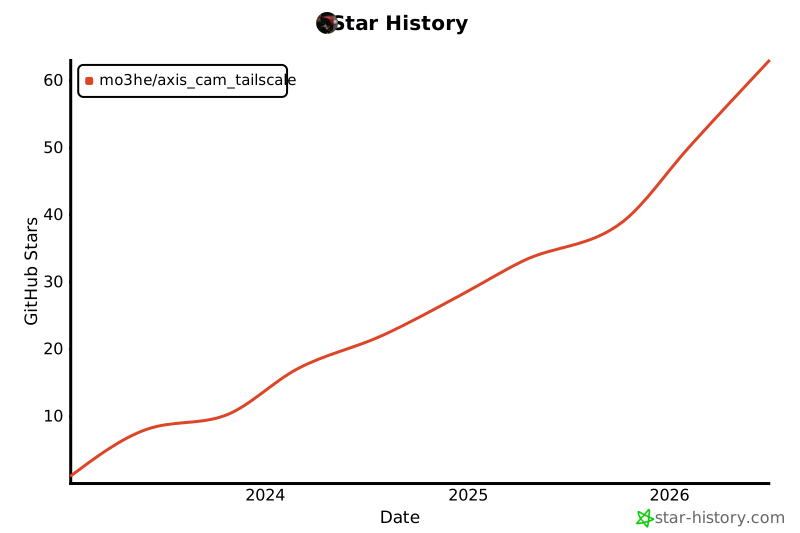](https://www.star-history.com/#Mo3he/Axis_Cam_Tailscale&Date)
|
||||
|
||||
@@ -407,22 +407,22 @@
|
||||
<div class="settings-form">
|
||||
<div class="settings-row">
|
||||
<label class="settings-label" for="input-server">Custom Server URL</label>
|
||||
<input class="settings-input" id="input-server" type="text" placeholder="https://controlplane.example.com (leave blank for Tailscale)">
|
||||
<input class="settings-input" id="input-server" type="text" autocomplete="off" placeholder="https://controlplane.example.com (leave blank for Tailscale)">
|
||||
<span class="settings-hint">Leave blank to use official Tailscale servers.</span>
|
||||
</div>
|
||||
<div class="settings-row">
|
||||
<label class="settings-label" for="input-authkey">Auth Key</label>
|
||||
<input class="settings-input" id="input-authkey" type="password" placeholder="tskey-auth-... (leave blank to use browser login)">
|
||||
<input class="settings-input" id="input-authkey" type="text" autocomplete="off" placeholder="tskey-auth-... (leave blank to use browser login)">
|
||||
<span class="settings-hint">One-time use. Cleared automatically after first successful connection.</span>
|
||||
</div>
|
||||
<div class="settings-row">
|
||||
<label class="settings-label" for="input-http-port">HTTP Proxy Port</label>
|
||||
<input class="settings-input" id="input-http-port" type="text" placeholder="8080">
|
||||
<input class="settings-input" id="input-http-port" type="text" autocomplete="off" placeholder="8080">
|
||||
<span class="settings-hint">Port for the outbound HTTP/HTTPS proxy. Default: 8080.</span>
|
||||
</div>
|
||||
<div class="settings-row">
|
||||
<label class="settings-label" for="input-socks-port">SOCKS5 Proxy Port</label>
|
||||
<input class="settings-input" id="input-socks-port" type="text" placeholder="1080">
|
||||
<input class="settings-input" id="input-socks-port" type="text" autocomplete="off" placeholder="1080">
|
||||
<span class="settings-hint">Port for the SOCKS5 proxy. Default: 1080.</span>
|
||||
</div>
|
||||
<div class="settings-actions">
|
||||
|
||||
@@ -407,22 +407,22 @@
|
||||
<div class="settings-form">
|
||||
<div class="settings-row">
|
||||
<label class="settings-label" for="input-server">Custom Server URL</label>
|
||||
<input class="settings-input" id="input-server" type="text" placeholder="https://controlplane.example.com (leave blank for Tailscale)">
|
||||
<input class="settings-input" id="input-server" type="text" autocomplete="off" placeholder="https://controlplane.example.com (leave blank for Tailscale)">
|
||||
<span class="settings-hint">Leave blank to use official Tailscale servers.</span>
|
||||
</div>
|
||||
<div class="settings-row">
|
||||
<label class="settings-label" for="input-authkey">Auth Key</label>
|
||||
<input class="settings-input" id="input-authkey" type="password" placeholder="tskey-auth-... (leave blank to use browser login)">
|
||||
<input class="settings-input" id="input-authkey" type="text" autocomplete="off" placeholder="tskey-auth-... (leave blank to use browser login)">
|
||||
<span class="settings-hint">One-time use. Cleared automatically after first successful connection.</span>
|
||||
</div>
|
||||
<div class="settings-row">
|
||||
<label class="settings-label" for="input-http-port">HTTP Proxy Port</label>
|
||||
<input class="settings-input" id="input-http-port" type="text" placeholder="8080">
|
||||
<input class="settings-input" id="input-http-port" type="text" autocomplete="off" placeholder="8080">
|
||||
<span class="settings-hint">Port for the outbound HTTP/HTTPS proxy. Default: 8080.</span>
|
||||
</div>
|
||||
<div class="settings-row">
|
||||
<label class="settings-label" for="input-socks-port">SOCKS5 Proxy Port</label>
|
||||
<input class="settings-input" id="input-socks-port" type="text" placeholder="1080">
|
||||
<input class="settings-input" id="input-socks-port" type="text" autocomplete="off" placeholder="1080">
|
||||
<span class="settings-hint">Port for the SOCKS5 proxy. Default: 1080.</span>
|
||||
</div>
|
||||
<div class="settings-actions">
|
||||
|
||||
@@ -407,22 +407,22 @@
|
||||
<div class="settings-form">
|
||||
<div class="settings-row">
|
||||
<label class="settings-label" for="input-server">Custom Server URL</label>
|
||||
<input class="settings-input" id="input-server" type="text" placeholder="https://controlplane.example.com (leave blank for Tailscale)">
|
||||
<input class="settings-input" id="input-server" type="text" autocomplete="off" placeholder="https://controlplane.example.com (leave blank for Tailscale)">
|
||||
<span class="settings-hint">Leave blank to use official Tailscale servers.</span>
|
||||
</div>
|
||||
<div class="settings-row">
|
||||
<label class="settings-label" for="input-authkey">Auth Key</label>
|
||||
<input class="settings-input" id="input-authkey" type="password" placeholder="tskey-auth-... (leave blank to use browser login)">
|
||||
<input class="settings-input" id="input-authkey" type="text" autocomplete="off" placeholder="tskey-auth-... (leave blank to use browser login)">
|
||||
<span class="settings-hint">One-time use. Cleared automatically after first successful connection.</span>
|
||||
</div>
|
||||
<div class="settings-row">
|
||||
<label class="settings-label" for="input-http-port">HTTP Proxy Port</label>
|
||||
<input class="settings-input" id="input-http-port" type="text" placeholder="8080">
|
||||
<input class="settings-input" id="input-http-port" type="text" autocomplete="off" placeholder="8080">
|
||||
<span class="settings-hint">Port for the outbound HTTP/HTTPS proxy. Default: 8080.</span>
|
||||
</div>
|
||||
<div class="settings-row">
|
||||
<label class="settings-label" for="input-socks-port">SOCKS5 Proxy Port</label>
|
||||
<input class="settings-input" id="input-socks-port" type="text" placeholder="1080">
|
||||
<input class="settings-input" id="input-socks-port" type="text" autocomplete="off" placeholder="1080">
|
||||
<span class="settings-hint">Port for the SOCKS5 proxy. Default: 1080.</span>
|
||||
</div>
|
||||
<div class="settings-actions">
|
||||
|
||||
@@ -407,22 +407,22 @@
|
||||
<div class="settings-form">
|
||||
<div class="settings-row">
|
||||
<label class="settings-label" for="input-server">Custom Server URL</label>
|
||||
<input class="settings-input" id="input-server" type="text" placeholder="https://controlplane.example.com (leave blank for Tailscale)">
|
||||
<input class="settings-input" id="input-server" type="text" autocomplete="off" placeholder="https://controlplane.example.com (leave blank for Tailscale)">
|
||||
<span class="settings-hint">Leave blank to use official Tailscale servers.</span>
|
||||
</div>
|
||||
<div class="settings-row">
|
||||
<label class="settings-label" for="input-authkey">Auth Key</label>
|
||||
<input class="settings-input" id="input-authkey" type="password" placeholder="tskey-auth-... (leave blank to use browser login)">
|
||||
<input class="settings-input" id="input-authkey" type="text" autocomplete="off" placeholder="tskey-auth-... (leave blank to use browser login)">
|
||||
<span class="settings-hint">One-time use. Cleared automatically after first successful connection.</span>
|
||||
</div>
|
||||
<div class="settings-row">
|
||||
<label class="settings-label" for="input-http-port">HTTP Proxy Port</label>
|
||||
<input class="settings-input" id="input-http-port" type="text" placeholder="8080">
|
||||
<input class="settings-input" id="input-http-port" type="text" autocomplete="off" placeholder="8080">
|
||||
<span class="settings-hint">Port for the outbound HTTP/HTTPS proxy. Default: 8080.</span>
|
||||
</div>
|
||||
<div class="settings-row">
|
||||
<label class="settings-label" for="input-socks-port">SOCKS5 Proxy Port</label>
|
||||
<input class="settings-input" id="input-socks-port" type="text" placeholder="1080">
|
||||
<input class="settings-input" id="input-socks-port" type="text" autocomplete="off" placeholder="1080">
|
||||
<span class="settings-hint">Port for the SOCKS5 proxy. Default: 1080.</span>
|
||||
</div>
|
||||
<div class="settings-actions">
|
||||
|
||||
+55
-39
@@ -3,22 +3,22 @@
|
||||
<head>
|
||||
<meta charset="UTF-8">
|
||||
<meta name="viewport" content="width=device-width, initial-scale=1.0">
|
||||
<title>Tailscale VPN for Axis Cameras</title>
|
||||
<meta name="description" content="Install Tailscale VPN directly on your Axis camera. Secure remote access with WireGuard, no extra hardware needed.">
|
||||
<title>Tailscale VPN for Axis Devices</title>
|
||||
<meta name="description" content="Install Tailscale VPN directly on your Axis device. Secure remote access with WireGuard, no extra hardware needed.">
|
||||
|
||||
<!-- Open Graph / LinkedIn -->
|
||||
<meta property="og:type" content="website">
|
||||
<meta property="og:url" content="https://mo3he.github.io/Axis_Cam_Tailscale/">
|
||||
<meta property="og:title" content="Tailscale VPN for Axis Cameras">
|
||||
<meta property="og:description" content="Secure remote access to your Axis cameras over WireGuard. No extra hardware, no complex network config - just install and connect.">
|
||||
<meta property="og:title" content="Tailscale VPN for Axis Devices">
|
||||
<meta property="og:description" content="Secure remote access to your Axis devices over WireGuard. No extra hardware, no complex network config - just install and connect.">
|
||||
<meta property="og:image" content="https://mo3he.github.io/Axis_Cam_Tailscale/og-image.png">
|
||||
<meta property="og:image:width" content="1340">
|
||||
<meta property="og:image:height" content="724">
|
||||
|
||||
<!-- Twitter Card -->
|
||||
<meta name="twitter:card" content="summary_large_image">
|
||||
<meta name="twitter:title" content="Tailscale VPN for Axis Cameras">
|
||||
<meta name="twitter:description" content="Secure remote access to your Axis cameras over WireGuard. No extra hardware, no complex network config - just install and connect.">
|
||||
<meta name="twitter:title" content="Tailscale VPN for Axis Devices">
|
||||
<meta name="twitter:description" content="Secure remote access to your Axis devices over WireGuard. No extra hardware, no complex network config - just install and connect.">
|
||||
<meta name="twitter:image" content="https://mo3he.github.io/Axis_Cam_Tailscale/og-image.png">
|
||||
|
||||
<style>
|
||||
@@ -117,6 +117,11 @@
|
||||
margin-bottom: 1.25rem;
|
||||
}
|
||||
.hero h1 span { color: var(--accent); }
|
||||
.hero-word {
|
||||
display: inline-block;
|
||||
color: var(--accent);
|
||||
transition: opacity 0.25s, transform 0.25s;
|
||||
}
|
||||
.hero p {
|
||||
font-size: 1.2rem;
|
||||
color: var(--muted);
|
||||
@@ -223,7 +228,7 @@
|
||||
width: fit-content;
|
||||
}
|
||||
.tag-recommended { background: rgba(52, 211, 153, 0.15); color: var(--green); }
|
||||
.tag-custom { background: rgba(251, 191, 36, 0.15); color: #fbbf24; }
|
||||
.tag-acap3 { background: rgba(168, 85, 247, 0.15); color: #a855f7; }
|
||||
.tag-root { background: rgba(239, 68, 68, 0.15); color: #ef4444; }
|
||||
.download-card h3 {
|
||||
font-size: 1.1rem;
|
||||
@@ -334,7 +339,6 @@
|
||||
<a href="#install">Install</a>
|
||||
<a href="https://github.com/Mo3he/Axis_Cam_Tailscale" target="_blank" rel="noopener">GitHub</a>
|
||||
<a href="https://github.com/sponsors/Mo3he" target="_blank" rel="noopener" style="color: #db61a2;">Sponsor</a>
|
||||
<a href="https://buymeacoffee.com/mo3he" target="_blank" rel="noopener" style="display:inline-flex;align-items:center;gap:0.35rem;background:#FFDD00;color:#000;font-weight:700;font-size:0.85rem;padding:0.35rem 0.85rem;border-radius:8px;line-height:1;">☕ Buy me a coffee</a>
|
||||
<button class="theme-toggle" id="themeToggle" aria-label="Toggle theme">
|
||||
<svg id="iconSun" viewBox="0 0 24 24" fill="none" stroke="currentColor" stroke-width="2" stroke-linecap="round" stroke-linejoin="round"><circle cx="12" cy="12" r="5"/><line x1="12" y1="1" x2="12" y2="3"/><line x1="12" y1="21" x2="12" y2="23"/><line x1="4.22" y1="4.22" x2="5.64" y2="5.64"/><line x1="18.36" y1="18.36" x2="19.78" y2="19.78"/><line x1="1" y1="12" x2="3" y2="12"/><line x1="21" y1="12" x2="23" y2="12"/><line x1="4.22" y1="19.78" x2="5.64" y2="18.36"/><line x1="18.36" y1="5.64" x2="19.78" y2="4.22"/></svg>
|
||||
<svg id="iconMoon" viewBox="0 0 24 24" fill="none" stroke="currentColor" stroke-width="2" stroke-linecap="round" stroke-linejoin="round" style="display:none"><path d="M21 12.79A9 9 0 1 1 11.21 3 7 7 0 0 0 21 12.79z"/></svg>
|
||||
@@ -345,8 +349,8 @@
|
||||
<!-- Hero -->
|
||||
<section class="hero">
|
||||
<div class="badge">Open Source · ACAP Package</div>
|
||||
<h1>Tailscale VPN for <span>Axis Cameras</span></h1>
|
||||
<p>Secure remote access to your Axis cameras over WireGuard. No extra hardware, no complex network config - just install and connect.</p>
|
||||
<h1>Tailscale VPN for<br>Axis <span class="hero-word" id="heroWord">Cameras</span></h1>
|
||||
<p>Secure remote access to your Axis devices over WireGuard. No extra hardware, no complex network config - just install and connect.</p>
|
||||
<div class="hero-buttons">
|
||||
<a href="#downloads" class="btn btn-primary">
|
||||
<svg width="18" height="18" fill="none" stroke="currentColor" stroke-width="2" stroke-linecap="round" stroke-linejoin="round" viewBox="0 0 24 24"><path d="M21 15v4a2 2 0 0 1-2 2H5a2 2 0 0 1-2-2v-4"/><polyline points="7 10 12 15 17 10"/><line x1="12" y1="15" x2="12" y2="3"/></svg>
|
||||
@@ -379,12 +383,12 @@
|
||||
<div class="feature-card">
|
||||
<div class="icon">⚡</div>
|
||||
<h3>No Root Required</h3>
|
||||
<p>Runs in user-space networking mode on Axis OS 12+. No need to enable root access on your camera.</p>
|
||||
<p>Runs in user-space networking mode on Axis OS 12+. No need to enable root access on your device.</p>
|
||||
</div>
|
||||
<div class="feature-card">
|
||||
<div class="icon">📦</div>
|
||||
<h3>Simple EAP Install</h3>
|
||||
<p>Upload the .eap file through your camera's web interface. Start the app and authenticate - done.</p>
|
||||
<p>Upload the .eap file through your device's web interface. Start the app and authenticate - done.</p>
|
||||
</div>
|
||||
<div class="feature-card">
|
||||
<div class="icon">🔄</div>
|
||||
@@ -394,19 +398,19 @@
|
||||
<div class="feature-card">
|
||||
<div class="icon">🌐</div>
|
||||
<h3>Headscale Compatible</h3>
|
||||
<p>The Custom variant supports self-hosted Headscale servers with configurable server URL and auth key.</p>
|
||||
<p>Supports self-hosted Headscale servers with configurable server URL and auth key, built into every variant.</p>
|
||||
</div>
|
||||
<div class="feature-card">
|
||||
<div class="icon">🏗️</div>
|
||||
<h3>ARM & AARCH64</h3>
|
||||
<p>Supports both ARM (armv7hf) and AARCH64 architectures, covering a wide range of Axis camera models.</p>
|
||||
<div class="icon">🔀</div>
|
||||
<h3>Outbound Proxy</h3>
|
||||
<p>Allows the device to route its own outbound traffic through Tailscale via a local HTTP/HTTPS and SOCKS5 proxy.</p>
|
||||
</div>
|
||||
</section>
|
||||
|
||||
<!-- Downloads -->
|
||||
<section id="downloads" class="downloads">
|
||||
<h2>Download</h2>
|
||||
<p class="subtitle">Pick the right variant for your camera and Axis OS version.</p>
|
||||
<p class="subtitle">Pick the right variant for your device and Axis OS version.</p>
|
||||
<div class="download-grid">
|
||||
<!-- Standard -->
|
||||
<div class="download-card">
|
||||
@@ -424,22 +428,6 @@
|
||||
</a>
|
||||
</div>
|
||||
</div>
|
||||
<!-- Custom -->
|
||||
<div class="download-card">
|
||||
<div class="tag tag-custom">Custom / Headscale</div>
|
||||
<h3>Custom Server</h3>
|
||||
<p>Supports custom Tailscale control servers and auth keys. Ideal for self-hosted Headscale setups.</p>
|
||||
<div class="arch-buttons">
|
||||
<a class="arch-btn" data-asset="custom" data-arch="aarch64" href="https://github.com/Mo3he/Axis_Cam_Tailscale/releases/latest" target="_blank" rel="noopener">
|
||||
<svg viewBox="0 0 24 24" fill="none" stroke="currentColor" stroke-width="2" stroke-linecap="round" stroke-linejoin="round"><path d="M21 15v4a2 2 0 0 1-2 2H5a2 2 0 0 1-2-2v-4"/><polyline points="7 10 12 15 17 10"/><line x1="12" y1="15" x2="12" y2="3"/></svg>
|
||||
AARCH64
|
||||
</a>
|
||||
<a class="arch-btn" data-asset="custom" data-arch="armv7hf" href="https://github.com/Mo3he/Axis_Cam_Tailscale/releases/latest" target="_blank" rel="noopener">
|
||||
<svg viewBox="0 0 24 24" fill="none" stroke="currentColor" stroke-width="2" stroke-linecap="round" stroke-linejoin="round"><path d="M21 15v4a2 2 0 0 1-2 2H5a2 2 0 0 1-2-2v-4"/><polyline points="7 10 12 15 17 10"/><line x1="12" y1="15" x2="12" y2="3"/></svg>
|
||||
ARM
|
||||
</a>
|
||||
</div>
|
||||
</div>
|
||||
<!-- ROOT -->
|
||||
<div class="download-card">
|
||||
<div class="tag tag-root">Root · Legacy</div>
|
||||
@@ -456,6 +444,18 @@
|
||||
</a>
|
||||
</div>
|
||||
</div>
|
||||
<!-- ACAP3 -->
|
||||
<div class="download-card">
|
||||
<div class="tag tag-acap3">ACAP3 · Legacy</div>
|
||||
<h3>ACAP3 (Older Axis OS)</h3>
|
||||
<p>For devices running Axis OS versions that do not support ACAP4. ARM only.</p>
|
||||
<div class="arch-buttons">
|
||||
<a class="arch-btn" data-asset="acap3" data-arch="armv7hf" href="https://github.com/Mo3he/Axis_Cam_Tailscale/releases/latest" target="_blank" rel="noopener">
|
||||
<svg viewBox="0 0 24 24" fill="none" stroke="currentColor" stroke-width="2" stroke-linecap="round" stroke-linejoin="round"><path d="M21 15v4a2 2 0 0 1-2 2H5a2 2 0 0 1-2-2v-4"/><polyline points="7 10 12 15 17 10"/><line x1="12" y1="15" x2="12" y2="3"/></svg>
|
||||
ARM
|
||||
</a>
|
||||
</div>
|
||||
</div>
|
||||
</div>
|
||||
</section>
|
||||
|
||||
@@ -467,14 +467,14 @@
|
||||
<div class="step-num">1</div>
|
||||
<div class="step-text">
|
||||
<strong>Download the EAP</strong>
|
||||
<span>Grab the right .eap file for your camera architecture from the releases page above.</span>
|
||||
<span>Grab the right .eap file for your device architecture from the releases page above.</span>
|
||||
</div>
|
||||
</div>
|
||||
<div class="step">
|
||||
<div class="step-num">2</div>
|
||||
<div class="step-text">
|
||||
<strong>Upload to your camera</strong>
|
||||
<span>Log into your Axis camera web interface and go to <strong>Apps → Add App</strong>. Upload the .eap file.</span>
|
||||
<strong>Upload to your device</strong>
|
||||
<span>Log into your Axis device web interface and go to <strong>Apps → Add App</strong>. Upload the .eap file.</span>
|
||||
</div>
|
||||
</div>
|
||||
<div class="step">
|
||||
@@ -540,6 +540,22 @@
|
||||
}
|
||||
});
|
||||
|
||||
// Rotate hero word
|
||||
var heroWord = document.getElementById('heroWord');
|
||||
var devices = ['Cameras', 'Door Stations', 'Intercoms', 'Speakers', 'Radars', 'Encoders'];
|
||||
var wordIdx = 0;
|
||||
function cycleWord() {
|
||||
wordIdx = (wordIdx + 1) % devices.length;
|
||||
heroWord.style.opacity = '0';
|
||||
heroWord.style.transform = 'translateY(8px)';
|
||||
setTimeout(function() {
|
||||
heroWord.textContent = devices[wordIdx];
|
||||
heroWord.style.opacity = '1';
|
||||
heroWord.style.transform = 'translateY(0)';
|
||||
}, 250);
|
||||
}
|
||||
setInterval(cycleWord, 3000);
|
||||
|
||||
// Rewrite download links to point directly to latest release assets
|
||||
fetch('https://api.github.com/repos/Mo3he/Axis_Cam_Tailscale/releases/latest')
|
||||
.then(function(r) { return r.json(); })
|
||||
@@ -555,9 +571,9 @@
|
||||
var archMatch = name.indexOf(arch) !== -1;
|
||||
var typeMatch = false;
|
||||
if (type === 'Tailscale_VPN') {
|
||||
typeMatch = name.indexOf('custom') === -1 && name.indexOf('root') === -1;
|
||||
} else if (type === 'custom') {
|
||||
typeMatch = name.indexOf('custom') !== -1;
|
||||
typeMatch = name.indexOf('root') === -1 && name.indexOf('acap3') === -1;
|
||||
} else if (type === 'acap3') {
|
||||
typeMatch = name.indexOf('acap3') !== -1;
|
||||
} else if (type === 'ROOT') {
|
||||
typeMatch = name.indexOf('root') !== -1;
|
||||
}
|
||||
|
||||
Reference in New Issue
Block a user