mirror of
https://github.com/Mo3he/Axis_Cam_Tailscale.git
synced 2026-09-03 06:36:56 +00:00

194 lines
8.0 KiB
Markdown
194 lines
8.0 KiB
Markdown
# Tailscale ACAP for Axis Cameras
|
||
|
||
**[Visit the Homepage](https://mo3he.github.io/Axis_Cam_Tailscale/)**
|
||
|
||
This repository provides an **ACAP package** that installs the [Tailscale VPN client](https://tailscale.com/) on Axis cameras.
|
||
|
||
- Secure remote access to cameras
|
||
- Easy to install via EAP package
|
||
- Works on **Axis OS 11.11+** (non-root version)
|
||
- Works on **legacy Axis OS 9.x / 10.x** via the ACAP 3 variant
|
||
- Based on **WireGuard VPN** technology
|
||
|
||
[](https://github.com/Mo3he/Axis_Cam_Tailscale/releases)
|
||
[](LICENSE)
|
||

|
||
[](https://github.com/sponsors/Mo3he)
|
||
|
||
> **Disclaimer:** This is an independent, community-developed ACAP package and is not an official Axis Communications product. It is not affiliated with, endorsed by, or supported by Axis Communications AB. Use it at your own risk. For official Axis software, visit axis.com
|
||
|
||
> **Tailscale Notice:** Tailscale is a product of Tailscale Inc. This package independently redistributes the Tailscale binaries under the [BSD 3-Clause License](LICENSE) and is not affiliated with, endorsed by, or supported by Tailscale Inc. For the official Tailscale client, visit [tailscale.com](https://tailscale.com).
|
||
---
|
||
|
||
## Table of Contents
|
||
|
||
- [Installation](#installation)
|
||
- [Usage](#usage)
|
||
- [Settings](#settings)
|
||
- [Proxy Support](#proxy-support)
|
||
- [Updating Tailscale](#updating-tailscale)
|
||
- [Purpose](#purpose)
|
||
- [Useful Links](#useful-links)
|
||
- [Compatibility](#compatibility)
|
||
- [Star History](#star-history)
|
||
- [Support](#support)
|
||
|
||
---
|
||
|
||
## Installation
|
||
|
||
Get the **prebuilt `.eap` file** from the [Releases page](https://github.com/Mo3he/Axis_Cam_Tailscale/releases).
|
||
|
||
1. Log into your Axis camera.
|
||
2. Go to **Apps → Add App**.
|
||
3. Upload the `.eap` file.
|
||
|
||
Once installed:
|
||
- Start the app.
|
||
- Click **Open** to view logs and get your Tailscale authentication URL.
|
||
- On uninstall, all changes/files are removed.
|
||
|
||
> You'll need a [Tailscale account](https://tailscale.com/) to authenticate.
|
||
|
||
---
|
||
|
||
## Usage
|
||
|
||
- Runs a C-based parameter bridge (compiled via ACAP SDK 1.15.1) that reads settings from the ACAP parameter store and launches Tailscale.
|
||
- View logs and connection status via the **Open** button in the app.
|
||
- Authenticate using the provided URL, or pre-enter an auth key in **Settings**.
|
||
- Change the **Custom Server URL** in Settings to use a self-hosted [Headscale](https://headscale.net/) control server.
|
||
- Parameter changes (ports, server URL, auth key) are applied automatically without needing to reinstall the app.
|
||
|
||
---
|
||
|
||
## Settings
|
||
|
||
All parameters are configurable via the web UI (**Open → Settings** card) and take effect immediately without reinstalling:
|
||
|
||
| Parameter | Default | Description |
|
||
|---|---|---|
|
||
| Custom Server URL | *(empty)* | Control server URL for [Headscale](https://headscale.net/) or other self-hosted servers. Leave blank to use Tailscale's official servers. |
|
||
| Auth Key | *(empty)* | Pre-authentication key (`tskey-auth-...`). Cleared automatically after first successful connection. Leave blank to authenticate via browser. |
|
||
| HTTP Proxy Port | `8080` | Port for the outbound HTTP/HTTPS proxy. |
|
||
| SOCKS5 Proxy Port | `1080` | Port for the outbound SOCKS5 proxy. |
|
||
|
||
---
|
||
|
||
|
||
All non-ROOT variants expose two local proxy endpoints that route outbound traffic through the Tailscale tunnel. The ports are configurable via **Settings → HTTP Proxy Port / SOCKS5 Proxy Port** in the web UI.
|
||
|
||
### HTTP CONNECT Proxy — `http://127.0.0.1:8080` (default)
|
||
|
||
Routes HTTP and HTTPS traffic. Set this wherever an HTTP/HTTPS proxy field is available on the camera:
|
||
|
||
| Location | Field | Value |
|
||
|---|---|---|
|
||
| System → Network → Global proxies | HTTP proxy | `http://127.0.0.1:<port>` |
|
||
| System → Network → Global proxies | HTTPS proxy | `http://127.0.0.1:<port>` |
|
||
| System → MQTT → Broker | HTTP proxy | `http://127.0.0.1:<port>` |
|
||
| System → MQTT → Broker | HTTPS proxy | `http://127.0.0.1:<port>` |
|
||
|
||
### SOCKS5 Proxy — `127.0.0.1:1080` (default)
|
||
|
||
For ACAP apps or services that support SOCKS5, set their proxy to `127.0.0.1:<port>`.
|
||
|
||
> The active proxy addresses are always shown in the **Proxy Configuration** card of the web UI.
|
||
|
||
> If you change a port that is already in use by another process, the app will log an error and exit rather than silently falling back to a different port.
|
||
|
||
---
|
||
|
||
## Updating Tailscale
|
||
|
||
- New `.eap` files are auto-built and released **weekly** (if a new Tailscale version is available).
|
||
- To update, simply install the new `.eap` over the existing one.
|
||
|
||
### Manual update (advanced)
|
||
|
||
Replace the binaries in the `lib/` folder:
|
||
- `tailscale`
|
||
- `tailscaled`
|
||
|
||
Download the latest versions: [Tailscale static builds](https://pkgs.tailscale.com/stable/#static)
|
||
|
||
#### Build locally
|
||
|
||
From the main directory of the version you want (`arm` / `aarch64`):
|
||
|
||
```bash
|
||
docker build --tag <package_name> .
|
||
docker cp $(docker create <package_name>):/opt/app ./build
|
||
```
|
||
|
||
---
|
||
|
||
## Good News
|
||
|
||
Tailscale ACAP can now run **without root privileges**, making it compatible with **Axis OS 11.11+**.
|
||
|
||
- Runs in **user space networking mode**.
|
||
|
||
For **full kernel networking**, use the **ROOT** version. Note: ROOT mode requires Axis OS 11.11–11.x — Axis OS 12 and later removed root access for third-party applications.
|
||
|
||
### Legacy camera support (Axis OS 9.x / 10.x)
|
||
|
||
An **ACAP 3** variant (`armv7hf_acap3`) is available for older cameras that do not support ACAP 4 / Axis OS 11+. It uses the same userspace networking mode and web UI, built against the ACAP SDK 3.5 toolchain.
|
||
|
||
---
|
||
|
||
## Purpose
|
||
|
||
Adding a VPN client directly to the camera enables:
|
||
- Secure remote access without additional hardware or complex network configuration.
|
||
- Easy setup through Tailscale’s lightweight WireGuard-based tunnel.
|
||
|
||
Learn more: [How Tailscale Works](https://tailscale.com/blog/how-tailscale-works/)
|
||
|
||
---
|
||
|
||
## Useful Links
|
||
|
||
- [Tailscale](https://tailscale.com/)
|
||
- [Tailscale GitHub](https://github.com/tailscale/tailscale)
|
||
- [WireGuard](https://www.wireguard.com/)
|
||
- [Axis Communications](https://www.axis.com/)
|
||
|
||
---
|
||
|
||
## Compatibility
|
||
|
||
The Tailscale ACAP is compatible with Axis cameras with **ARM** and **AARCH64**-based SoCs.
|
||
|
||
| Variant | Architecture | Axis OS | Notes |
|
||
|---|---|---|---|
|
||
| `aarch64` | AArch64 | 11.11+ (ACAP 4) | Standard, userspace networking, configurable proxy ports |
|
||
| `armv7hf` | ARMv7 | 11.11+ (ACAP 4) | Standard, userspace networking, configurable proxy ports |
|
||
| `aarch64_root` | AArch64 | 11.11 – 11.x (ACAP 4) | Full kernel networking (root) — not supported on OS 12+ |
|
||
| `armv7hf_root` | ARMv7 | 11.11 – 11.x (ACAP 4) | Full kernel networking (root) — not supported on OS 12+ |
|
||
| `armv7hf_acap3` | ARMv7 | **9.x – 10.x** | Legacy cameras, ACAP SDK 3 |
|
||
|
||
> Not sure which variant to use? Check **System → Properties → Firmware version** on your camera. Axis OS 12+ → use the standard variant (`aarch64` or `armv7hf`). Axis OS 11.11–11.x → standard variant, or ROOT if you need kernel networking. Axis OS 9.x/10.x on ARMv7 → use `armv7hf_acap3`.
|
||
|
||
You can verify your device details using the following command:
|
||
|
||
```bash
|
||
curl --anyauth "*" -u <username>:<password> <device_ip>/axis-cgi/basicdeviceinfo.cgi --data '{"apiVersion":"1.0","context":"Client defined request ID","method":"getAllProperties"}'
|
||
```
|
||
|
||
> Replace `<device_ip>`, `<username>`, and `<password>` with your device credentials.
|
||
> Enclose your password in quotes `' '` if it contains special characters.
|
||
|
||
---
|
||
|
||
## Star History
|
||
|
||
[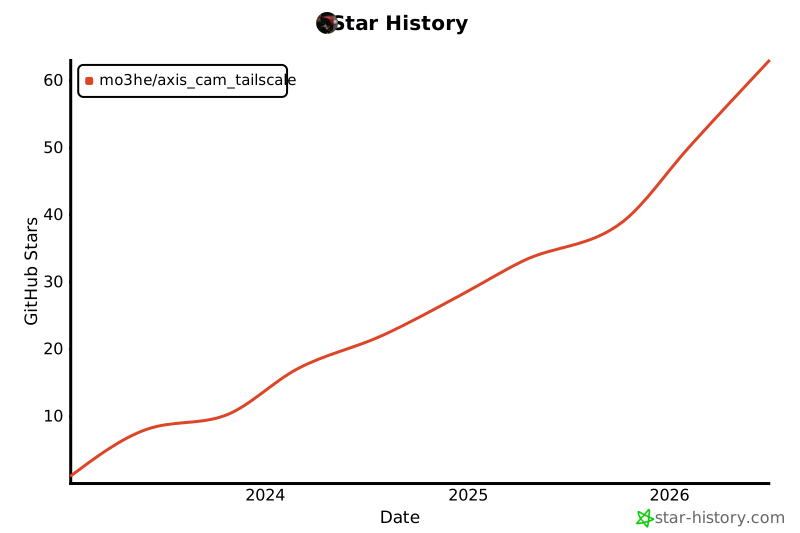](https://www.star-history.com/#Mo3he/Axis_Cam_Tailscale&Date)
|
||
|
||
---
|
||
|
||
## Support
|
||
|
||
If you like this project and want to support my work:
|
||
[Sponsor Me](https://github.com/sponsors/Mo3he)
|