mirror of
https://github.com/Mo3he/Axis_Cam_Tailscale.git
synced 2026-08-19 13:47:00 +00:00
 Weston Blieden
47c3894002
Weston Blieden
47c3894002
Much of this work is AXIS OS 13 preparation. Of the OS 13 breaking
changes, all are now addressed except one: recompiled against the
updated SDK for 64-bit time (Y2038), migrated to Manifest Schema v2
with declared OS compatibility, audited all binaries for executable
stack (all clean, GNU_STACK rw-), and verified the web UI end to end
over HTTPS. The only outstanding item is signing through the Axis
ACAP Portal, pending a registered vendorId.

The four ACAP 4 variants (aarch64, armv7hf, and their ROOT versions)
carried byte-identical copies of the C bridge, run script, web UI, and
Makefile per architecture, diverging only between standard and ROOT.
Merge them into a single common/app/ tree:

- param_bridge.c: proxy-port parameters gated behind -DHAS_PROXY_PORTS
  (set via EXTRA_CFLAGS in the standard Dockerfiles); ROOT builds omit
  them as before
- Tailscale_VPN_run: variant passed as $1 ("standard"/"root") selects
  userspace vs kernel networking, port-collision checks, and IP
  forwarding for advertised routes
- index.html: detects proxy support at runtime from the settings
  response, hiding the proxy card and keeping the params out of save
  requests on ROOT builds (fixes ROOT UI always showing proxy fields
  and falsely reporting save errors)

Standard variants move to ACAP Native SDK 12.10.0 and Manifest Schema
v2 (vendorId, compatibleOsVersions); verified installable and working
on OS 10.12, 11.11, and 12.10, so OS 13 readiness costs no backward
compatibility. ROOT variants intentionally stay on SDK 1.15.1 since
OS 12+ never runs root apps.

All builds (including arm_acap3) now use the repository root as build
context with -f <variant>/Dockerfile; CI updated accordingly and a
.dockerignore added to keep the context lean. Tailscale binaries are
no longer tracked in git; *.eap outputs are now gitignored.

README: correct the standard variant's floor to OS 10.12+ and ROOT to
10.12-11.x (both live-verified), update build/update instructions for
the shared tree, and check off completed OS 13 readiness items.
254 lines
15 KiB
Markdown
254 lines
15 KiB
Markdown
# Tailscale ACAP for Axis Cameras
|
||
|
||
**[Visit the Homepage](https://mo3he.github.io/Axis_Cam_Tailscale/)**
|
||
|
||
This repository provides an **ACAP package** that installs the [Tailscale VPN client](https://tailscale.com/) on Axis cameras.
|
||
|
||
- Secure remote access to cameras
|
||
- Easy to install via EAP package
|
||
- Works on **Axis OS 10.12+** (non-root version, verified across 10.12–12.10)
|
||
- Works on **legacy Axis OS 9.x / 10.x** via the ACAP 3 variant
|
||
- Based on **WireGuard VPN** technology
|
||
|
||
[](https://github.com/Mo3he/Axis_Cam_Tailscale/releases)
|
||
[](LICENSE)
|
||

|
||
[](https://github.com/sponsors/Mo3he)
|
||
[](https://www.buymeacoffee.com/mo3he)
|
||
|
||
> **Disclaimer:** This is an independent, community-developed ACAP package and is not an official Axis Communications product. It is not affiliated with, endorsed by, or supported by Axis Communications AB. Use it at your own risk. For official Axis software, visit axis.com
|
||
|
||
> **Tailscale Notice:** Tailscale is a product of Tailscale Inc. This package independently redistributes the Tailscale binaries under the [BSD 3-Clause License](LICENSE) and is not affiliated with, endorsed by, or supported by Tailscale Inc. For the official Tailscale client, visit [tailscale.com](https://tailscale.com).
|
||
---
|
||
|
||
## Table of Contents
|
||
|
||
- [Installation](#installation)
|
||
- [Usage](#usage)
|
||
- [Settings](#settings)
|
||
- [Proxy Support](#proxy-support)
|
||
- [Accessing Tailnet Services from the Camera](#accessing-tailnet-services-from-the-camera)
|
||
- [Updating Tailscale](#updating-tailscale)
|
||
- [Purpose](#purpose)
|
||
- [Useful Links](#useful-links)
|
||
- [Compatibility](#compatibility)
|
||
- [Roadmap](#roadmap)
|
||
- [Star History](#star-history)
|
||
- [Support](#support)
|
||
|
||
---
|
||
|
||
## Installation
|
||
|
||
Get the **prebuilt `.eap` file** from the [Releases page](https://github.com/Mo3he/Axis_Cam_Tailscale/releases).
|
||
|
||
1. Log into your Axis camera.
|
||
2. Go to **Apps → Add App**.
|
||
3. Upload the `.eap` file.
|
||
|
||
Once installed:
|
||
- Start the app.
|
||
- Click **Open** to view logs and get your Tailscale authentication URL.
|
||
- On uninstall, all changes/files are removed.
|
||
|
||
> You'll need a [Tailscale account](https://tailscale.com/) to authenticate.
|
||
|
||
---
|
||
|
||
## Usage
|
||
|
||
- Runs a C-based parameter bridge (compiled via ACAP SDK 1.15.1) that reads settings from the ACAP parameter store and launches Tailscale.
|
||
- View logs and connection status via the **Open** button in the app.
|
||
- Authenticate using the provided URL, or pre-enter an auth key in **Settings**.
|
||
- Change the **Custom Server URL** in Settings to use a self-hosted [Headscale](https://headscale.net/) control server.
|
||
- Parameter changes (ports, server URL, auth key) are applied automatically without needing to reinstall the app.
|
||
|
||
---
|
||
|
||
## Settings
|
||
|
||
All parameters are configurable via the web UI (**Open → Settings** card) and take effect immediately without reinstalling:
|
||
|
||
| Parameter | Default | Description |
|
||
|---|---|---|
|
||
| Custom Server URL | *(empty)* | Control server URL for [Headscale](https://headscale.net/) or other self-hosted servers. Leave blank to use Tailscale's official servers. |
|
||
| Auth Key | *(empty)* | Pre-authentication key (`tskey-auth-...`). Cleared automatically after first successful connection. Leave blank to authenticate via browser. |
|
||
| HTTP Proxy Port | `8080` | Port for the outbound HTTP/HTTPS proxy. |
|
||
| SOCKS5 Proxy Port | `1080` | Port for the outbound SOCKS5 proxy. |
|
||
| Accept DNS | `off` | Passes `--accept-dns=true` to `tailscale up`. Allows the tailnet to push DNS settings to the camera. Off by default to avoid overriding the camera's DNS configuration. Not available on `armv7hf_acap3`. |
|
||
| Accept Routes | `off` | Passes `--accept-routes=true` to `tailscale up`. Allows the camera to use subnet routes advertised by other nodes in the tailnet. Not available on `armv7hf_acap3`. |
|
||
|
||
---
|
||
|
||
|
||
All non-ROOT variants expose two local proxy endpoints that route outbound traffic through the Tailscale tunnel. The ports are configurable via **Settings → HTTP Proxy Port / SOCKS5 Proxy Port** in the web UI.
|
||
|
||
### HTTP CONNECT Proxy — `http://127.0.0.1:8080` (default)
|
||
|
||
Routes HTTP and HTTPS traffic. Set this wherever an HTTP/HTTPS proxy field is available on the camera:
|
||
|
||
| Location | Field | Value |
|
||
|---|---|---|
|
||
| System → Network → Global proxies | HTTP proxy | `http://127.0.0.1:<port>` |
|
||
| System → Network → Global proxies | HTTPS proxy | `http://127.0.0.1:<port>` |
|
||
| System → MQTT → Broker | HTTP proxy | `http://127.0.0.1:<port>` |
|
||
| System → MQTT → Broker | HTTPS proxy | `http://127.0.0.1:<port>` |
|
||
|
||
### SOCKS5 Proxy — `127.0.0.1:1080` (default)
|
||
|
||
For ACAP apps or services that support SOCKS5, set their proxy to `127.0.0.1:<port>`.
|
||
|
||
> The active proxy addresses are always shown in the **Proxy Configuration** card of the web UI.
|
||
|
||
> If you change a port that is already in use by another process, the app will log an error and exit rather than silently falling back to a different port.
|
||
|
||
---
|
||
|
||
## Accessing Tailnet Services from the Camera
|
||
|
||
There is an important asymmetry to understand. Making the camera **reachable from** the tailnet (browsing to it, VAPIX, SSH from another tailnet node) works on every build. The harder direction is the camera **reaching out to** a tailnet peer, for example mounting an SMB/CIFS network share hosted on another node. How well this works depends on which build you use.
|
||
|
||
### Why the build matters
|
||
|
||
| Build | Networking mode | Camera-initiated access to tailnet peers |
|
||
|---|---|---|
|
||
| Non-root (`aarch64`, `armv7hf`) and `armv7hf_acap3` | `--tun=userspace-networking` (no kernel `tailscale0` interface) | Only through the local **SOCKS5 / HTTP proxies**, and only for **proxy-aware** apps. Firmware system services (the SMB share client, NTP, etc.) are proxy-unaware, so they **cannot** reach a peer's `100.x` Tailscale IP directly. |
|
||
| **ROOT** (`aarch64_root`, `armv7hf_root`) | Kernel networking with a real `tailscale0` interface | Peer `100.x` IPs are routable at the OS level, so firmware services **can** connect directly. Enable **Accept Routes** to also reach subnets behind other nodes. |
|
||
|
||
In short: on non-root builds the proxies cover apps that know how to use a proxy, but a system feature like "add network share" opens a raw socket that never touches the tunnel. The ROOT build is the clean way to let the camera *consume* tailnet services.
|
||
|
||
### Plan B: reverse-SSH tunnel
|
||
> **Requires root on the camera.** Port 445 is privileged, so binding it needs a root-capable build (e.g. developer certificates installed).
|
||
|
||
If you cannot use the ROOT build but still need the camera to mount a share on a machine that is on your tailnet, you can make the remote share appear **local** to the camera with a reverse SSH tunnel. Because the destination becomes `127.0.0.1`, the proxy-unaware SMB client never has to route over the tailnet.
|
||
|
||
From a computer that has both the share and tailnet access to the camera:
|
||
|
||
```bash
|
||
# Forward the camera's local port 445 back to the SMB share on this machine
|
||
ssh -R 445:localhost:445 root@<camera-tailscale-ip>
|
||
```
|
||
|
||
Then, in the camera's **System → Storage → Add network share** dialog, use `127.0.0.1` as the share host and connect.
|
||
|
||
---
|
||
|
||
## Updating Tailscale
|
||
|
||
- New `.eap` files are auto-built and released **weekly** (if a new Tailscale version is available).
|
||
- To update, simply install the new `.eap` over the existing one.
|
||
|
||
### Manual update (advanced)
|
||
|
||
Replace the binaries in `common/app/lib/` (shared by `aarch64`, `armv7hf`, and their ROOT variants) or `arm_acap3/app/lib/` (legacy variant, kept separate):
|
||
- `tailscale`
|
||
- `tailscaled`
|
||
|
||
Download the latest versions: [Tailscale static builds](https://pkgs.tailscale.com/stable/#static)
|
||
|
||
#### Build locally
|
||
|
||
The Tailscale binaries are not stored in git, so first download them (see [Manual update](#manual-update-advanced) above) and place them in `common/app/lib/` — or `arm_acap3/app/lib/` for the legacy variant.
|
||
|
||
All variants build from the **repository root**, pointing at the variant's own `Dockerfile`:
|
||
|
||
```bash
|
||
docker build -f aarch64/Dockerfile --tag <package_name> .
|
||
docker cp $(docker create <package_name>):/opt/app ./build
|
||
```
|
||
|
||
(Same for the others — just swap in `arm/Dockerfile`, `aarch64_ROOT/Dockerfile`, `arm_ROOT/Dockerfile`, or `arm_acap3/Dockerfile`.)
|
||
|
||
---
|
||
|
||
## Good News
|
||
|
||
Tailscale ACAP can now run **without root privileges**, making it compatible with **Axis OS 10.12+** — verified working across Axis OS 10.12, 11.11, and 12.10.
|
||
|
||
- Runs in **user space networking mode**.
|
||
|
||
For **full kernel networking**, use the **ROOT** version. Note: ROOT mode requires Axis OS 10.12–11.x — Axis OS 12 and later removed root access for third-party applications.
|
||
|
||
### Legacy camera support (Axis OS 9.x / 10.x)
|
||
|
||
An **ACAP 3** variant (`armv7hf_acap3`) is available for older cameras that do not support ACAP 4 / Axis OS 11+. It uses the same userspace networking mode and web UI, built against the ACAP SDK 3.5 toolchain.
|
||
|
||
---
|
||
|
||
## Purpose
|
||
|
||
Adding a VPN client directly to the camera enables:
|
||
- Secure remote access without additional hardware or complex network configuration.
|
||
- Easy setup through Tailscale’s lightweight WireGuard-based tunnel.
|
||
|
||
Learn more: [How Tailscale Works](https://tailscale.com/blog/how-tailscale-works/)
|
||
|
||
---
|
||
|
||
## Useful Links
|
||
|
||
- [Tailscale](https://tailscale.com/)
|
||
- [Tailscale GitHub](https://github.com/tailscale/tailscale)
|
||
- [WireGuard](https://www.wireguard.com/)
|
||
- [Axis Communications](https://www.axis.com/)
|
||
|
||
---
|
||
|
||
## Compatibility
|
||
|
||
The Tailscale ACAP is compatible with Axis cameras with **ARM** and **AARCH64**-based SoCs.
|
||
|
||
| Variant | Architecture | Axis OS | Notes |
|
||
|---|---|---|---|
|
||
| `aarch64` | AArch64 | 10.12 – 13 (ACAP 4) | Standard, userspace networking, configurable proxy ports |
|
||
| `armv7hf` | ARMv7 | 10.12 – 13 (ACAP 4) | Standard, userspace networking, configurable proxy ports |
|
||
| `aarch64_root` | AArch64 | 10.12 – 11.x (ACAP 4) | Full kernel networking (root) — not supported on OS 12+ |
|
||
| `armv7hf_root` | ARMv7 | 10.12 – 11.x (ACAP 4) | Full kernel networking (root) — not supported on OS 12+ |
|
||
| `armv7hf_acap3` | ARMv7 | **9.x – 10.x** | Legacy cameras, ACAP SDK 3 |
|
||
|
||
> Not sure which variant to use? Check **System → Properties → Firmware version** on your camera. Axis OS 12+ → use the standard variant (`aarch64` or `armv7hf`). Axis OS 10.12–11.x → standard variant works too, or ROOT if you need kernel networking. Axis OS 9.x → use `armv7hf_acap3`.
|
||
>
|
||
> The standard variant's floor was verified by live-testing the same build on Axis OS 10.12.300, 11.11.212, and 12.10.68 — it is not limited to 11.11+ as earlier releases implied. The ROOT variant was also verified on Axis OS 10.12.300 with genuine kernel networking confirmed over SSH (processes running as `root`, a real `tailscale0` kernel interface present, and `ip_forward` correctly toggling on when subnet routes are advertised) — Axis OS 10.x ran third-party apps as root by default, before the privilege sandboxing introduced later, so ROOT was never actually limited to 11.11+.
|
||
|
||
You can verify your device details using the following command:
|
||
|
||
```bash
|
||
curl --anyauth "*" -u <username>:<password> <device_ip>/axis-cgi/basicdeviceinfo.cgi --data '{"apiVersion":"1.0","context":"Client defined request ID","method":"getAllProperties"}'
|
||
```
|
||
|
||
> Replace `<device_ip>`, `<username>`, and `<password>` with your device credentials.
|
||
> Enclose your password in quotes `' '` if it contains special characters.
|
||
|
||
---
|
||
|
||
## Roadmap
|
||
|
||
### AXIS OS 13 Preparation
|
||
|
||
AXIS OS 13 (scheduled for September 2026) introduces several breaking changes that affect all ACAP applications. The following items are required to maintain compatibility. See the full [AXIS OS 13 breaking changes](https://www.axis.com/for-developers/news/AXIS-OS-13-breaking-changes) announcement for details.
|
||
|
||
- [x] **Recompile for 64-bit time (Y2038)** - AXIS OS 13 switches to a 64-bit time interface. All ACAP apps must be recompiled against the updated SDK. Cameras with incompatible apps installed will roll back the OS upgrade rather than proceed. Done for the standard `aarch64`/`armv7hf` builds (now built against ACAP Native SDK 12.10.0); the ROOT variants intentionally stay on the older SDK since Axis OS 12+ never supports root third-party apps, so they can never reach OS 13 regardless.
|
||
- [x] **Migrate to Manifest Schema v2** - The `manifest.json` must use Manifest Schema v2, including an explicit declaration of compatible AXIS OS versions, to satisfy the new signing and compatibility requirements. Done for `aarch64`/`armv7hf` (schema 2.0.0, `compatibleOsVersions` declared); verified this does not break installability on older firmware (OS 10.12–12.10 all tested and working) before promoting it as the standard build.
|
||
- [x] **Audit for executable stack usage** - Any ACAP compiled with an executable stack must be recompiled to comply with the new security restrictions in AXIS OS 13. Checked all compiled binaries (`param_bridge` for `aarch64`/`armv7hf`, both standard and ROOT, plus the bundled `tailscale`/`tailscaled` Go binaries) via `objdump`'s `GNU_STACK` program header — all report `flags rw-` (no executable stack) on every architecture and variant.
|
||
- [x] **Verify web UI works over HTTPS** - AXIS OS 13 enforces HTTPS-only connections by default. The bundled web UI must be tested to confirm it functions correctly under this constraint. Verified live: the page and every endpoint it calls (`param.cgi` GET/update, the `reverseProxy` settings API GET/POST, `applications/list.cgi`, `systemlog.cgi`, the restart trigger) all work correctly over HTTPS. The UI only ever issues relative-path requests (no hardcoded `http://` fetch targets), so it inherits the page's own protocol with no mixed-content risk.
|
||
- [ ] **Sign the ACAP via the Axis ACAP Portal** - AXIS OS 13 removes the ability to install unsigned applications in production environments. The app must be submitted and signed through the official Axis ACAP Portal to remain installable. Deferred for now — the manifest's `vendorId` is a placeholder value, not yet a portal-registered one.
|
||
|
||
### General Improvements
|
||
|
||
- [x] **Accept DNS from tailnet toggle** - Add an opt-in setting to the settings page that passes `--accept-dns=true` to `tailscale up`. Defaults to off to prevent Tailscale from overriding `resolv.conf` on cameras that don't need MagicDNS.
|
||
- [x] **Accept routes toggle** - Add an opt-in setting that passes `--accept-routes=true` to `tailscale up`, allowing the camera to use subnet routes advertised by other nodes in the tailnet.
|
||
- [ ] **Switch to tiny-tailscale binaries** - Evaluate replacing the bundled `tailscale` and `tailscaled` binaries with [tiny-tailscale](https://github.com/iamromulan/tiny-tailscale) builds. These combine both into a single binary, strip unused features, and are significantly smaller (~43% reduction), reducing install size and memory footprint across all architectures.
|
||
|
||
---
|
||
|
||
## Star History
|
||
|
||
[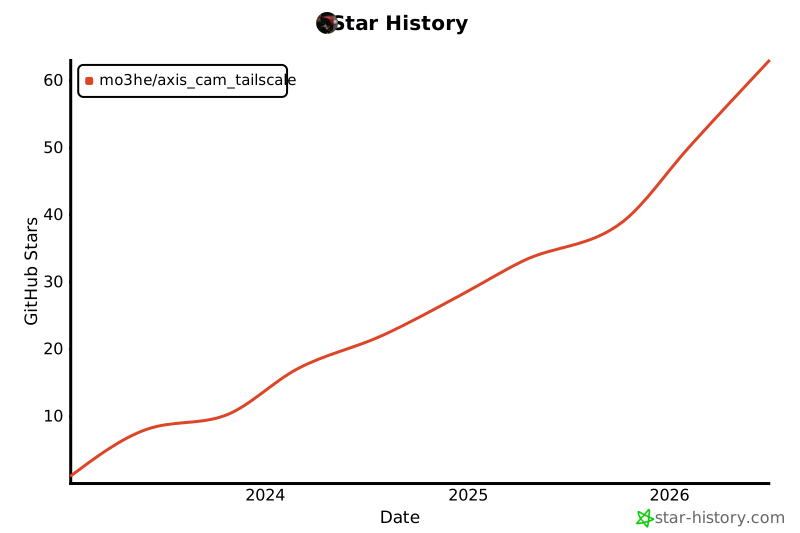](https://www.star-history.com/#Mo3he/Axis_Cam_Tailscale&Date)
|
||
|
||
---
|
||
|
||
## Support
|
||
|
||
If you like this project and want to support my work:
|
||
[Sponsor Me](https://github.com/sponsors/Mo3he)
|