Chris LuandGitHub
1f515f9d02
Chris LuandGitHub
1f515f9d02
* fix(s3api): cross-SSE copy operations and bring them back into CI (#9281)

Four cross-SSE copy tests were broken on master and excluded from CI with
the comment "pre-existing SSE-C issues":

  - TestSSECObjectCopyIntegration/Copy_SSE-C_to_SSE-C_with_different_key
  - TestSSEKMSObjectCopyIntegration/Copy_SSE-KMS_with_different_key
  - TestCrossSSECopy/SSE-S3_to_SSE-C
  - TestSSEMultipartCopy/Copy_SSE-KMS_Multipart_Object

Each surfaced as a different symptom — 500 InternalError, CRC32 mismatch,
"unexpected EOF", MD5 mismatch — but they were all instances of the same
root pattern that #8908 hit on UploadPartCopy: copy paths writing
destination chunks tagged inconsistently with the bytes on disk, so
detectPrimarySSEType / IsSSE*Encrypted disagreed about what the read
path should do.

Five fixes in this PR, each with its own targeted test:

  1. SSE-C IV format: putToFiler stored entry.Extended[SeaweedFSSSEIV]
     as raw bytes (with a comment saying so), but StoreSSECIVInMetadata
     stored it base64-encoded. The two readers (the GET handler reading
     it raw, and GetSSECIVFromMetadata reading it base64-decoded) each
     matched one writer but not the other. Standardise on raw bytes
     everywhere; GetSSECIVFromMetadata accepts the legacy base64 form
     for backward compat.

  2. SSE-C single-part copy chunk tagging: copyChunkWithReencryption
     re-encrypted the bytes for the destination but never set the
     destination chunk's SseType / SseMetadata. With chunks left
     SseType=NONE, detectPrimarySSEType returned "None" and the GET
     served still-encrypted volume bytes raw without decryption.
     Tag the chunk after re-encryption.

  3. SSE-KMS single-part copy chunk tagging: same shape as (2). Also,
     the function discarded the destSSEKey returned from
     CreateSSEKMSEncryptedReaderWithBucketKey (with `_`) — that key
     carries the freshly-minted EncryptedDataKey + IV the read path
     needs, so it must be captured and serialized into the destination
     chunk's per-chunk metadata (and bubbled up to the entry-level
     SeaweedFSSSEKMSKey for single-chunk objects whose read path falls
     back to the entry-level key).

  4. SSE-KMS multipart source decryption: copyChunkWithSSEKMSReencryption
     decrypted every source chunk with the entry-level sourceSSEKey.
     For multipart SSE-KMS objects each chunk has its own EDK + IV in
     per-chunk metadata, so the entry-level key is wrong. Decrypt with
     per-chunk metadata when present.

  5. Same-key copy fast path chunk tagging: copySingleChunk uses
     createDestinationChunk which dropped SseType / SseMetadata. For
     same-key copies (e.g. SSE-KMS source → SSE-KMS dest with the same
     KMS key) the fast path reuses the source ciphertext as-is, so the
     destination chunks must keep the source's SSE tagging. Add a
     createDestinationChunkPreservingSSE helper for the fast path; the
     re-encryption paths still call createDestinationChunk and then
     overwrite the SSE fields after re-encrypting.

CI: extend the comprehensive-test TEST_PATTERN to include the four test
families that were previously excluded (`.*ObjectCopyIntegration`,
`TestCrossSSECopy`, `TestSSEMultipartCopy`) so this category of
regression is caught going forward. The exclusion comment is removed.

Tests:
  - All four originally-failing tests pass.
  - The full pre-existing TestSSE* / TestCrossSSE / TestGitHub7562 /
    TestCopyToBucketDefaultEncryptedRegression / TestSSEMultipart suite
    still passes.
  - go test -race ./weed/s3api/ passes.

Refs #8908, #9280.

* fix(s3api): SSE-KMS copy ChunkOffset must stay 0 (review feedback on #9282)

CreateSSEKMSEncryptedReaderWithBucketKey initialises a fresh CTR stream
at counter 0 with a per-chunk random IV — there is no base-IV-plus-offset
relationship. The previous commit on this branch wrote
`destSSEKey.ChunkOffset = chunk.Offset` onto the per-chunk metadata,
which the read-side CreateSSEKMSDecryptedReader applies as
calculateIVWithOffset(IV, ChunkOffset) — i.e. it advances the
decryption IV by chunk.Offset/16 blocks beyond where the encryption
actually wrote.

The bug only manifests for SSE-KMS-to-SSE-KMS-with-different-key copies
of multipart sources (where source chunks live at non-zero offsets),
which is why the existing TestSSEKMSObjectCopyIntegration (single-chunk
source) and TestSSEMultipartCopy/Copy_SSE-KMS_Multipart_Object (same-key
copy that takes the fast preserving path, not the re-encrypt path)
both happened to pass. Set ChunkOffset to 0 to match the actual
encryption position. Existing tests still pass; the dangerous case is
only reachable with a multipart SSE-KMS source and a different
destination key, which is not currently exercised in CI.

Found by gemini-code-assist review on PR #9282.

* fix(s3api): use first dst chunk's full key for entry-level SSE-KMS metadata in remaining copy paths (review feedback on #9282)

Earlier this branch fixed copyChunksWithSSEKMSReencryption to populate
the entry-level SeaweedFSSSEKMSKey from the first destination chunk's
fully-formed metadata (with EDK + IV) instead of a stub key with only
KeyID + EncryptionContext + BucketKeyEnabled. The same fix needs to
apply to the other two paths that build entry-level SSE-KMS metadata:

  - copyMultipartCrossEncryption() — cross-encryption to SSE-KMS dest.
    Per-chunk metadata comes from copyCrossEncryptionChunk's
    CreateSSEKMSEncryptedReaderWithBucketKey call, so chunks[0] has
    a real EDK + IV. Use it.

  - copyChunksWithSSEKMS() direct (same-key) branch. After
    createDestinationChunkPreservingSSE in copySingleChunk, dst chunks
    carry the source's per-chunk SSE-KMS metadata. Use chunks[0] for
    the entry-level key so single-chunk same-key copies don't fall
    back to a stub key on the read path.

Without this, single-chunk SSE-KMS reads through these two paths
failed at GET with "Invalid ciphertext format" — KMS unwrap was
called on an empty EDK.

Found by coderabbitai review on PR #9282.

* fix(s3api): add 0-byte fallback to SSE-KMS reencryption entry-level metadata (review feedback on #9282)

copyChunksWithSSEKMSReencryption was missing the fallback for 0-byte
objects (where dstChunks is empty), inconsistent with the fallback in
copyChunksWithSSEKMS direct branch and copyMultipartCrossEncryption.
Without it, a 0-byte SSE-KMS copy would land with no entry-level
SeaweedFSSSEKMSKey, so the read path's IsSSEKMSEncryptedInternal check
would not recognise the empty object as SSE-KMS.

Mirror the existing fallback: build a stub SSEKMSKey with KeyID,
context and bucket-key state; serialize it as the entry-level key.

Found by gemini-code-assist review on PR #9282.

* fix(s3api): SSE-KMS direct copy must check encryption context + bucket-key, not just key ID (review feedback on #9282)

DetermineSSEKMSCopyStrategy / CanDirectCopySSEKMS only compares the
source and destination KMS key IDs, but the destination request can
also change the encryption context or the BucketKey flag. Both are
embedded in the source ciphertext's wrapped EDK; preserving the source
metadata verbatim does not satisfy a destination request that asks
for different settings, so the destination object would silently
report the source's context/flag instead of what was requested.

Add srcSSEKMSStateMatchesDest: deserialize the source's stored
SSEKMSKey and compare its EncryptionContext + BucketKeyEnabled to the
destination request. If either differs, force the slow re-encrypt
path (SSEKMSCopyStrategyDecryptEncrypt) so the destination gets a
freshly-wrapped EDK bound to the requested context/flag.

A malformed source key is treated as non-matching (conservative).
nil and empty encryption-context maps are treated as equal to avoid
spurious divergence when the request omits the context header.

Found by coderabbitai review on PR #9282.

* fix(s3api): copyMultipartSSEKMSChunk falls back to entry-level key + entry-level metadata uses first chunk's full key (review feedback on #9282)

Two related issues in copyMultipartSSEKMSChunks / copyMultipartSSEKMSChunk:

1. copyMultipartSSEKMSChunks built the destination's entry-level
   SeaweedFSSSEKMSKey from a stub (KeyID + context + bucket-key only),
   missing the EDK + IV. Single-chunk reads through this path fall
   back to entry-level keyData and would fail at GET because KMS would
   be asked to unwrap an empty EDK. Mirrors the fix in
   copyChunksWithSSEKMS / copyMultipartCrossEncryption /
   copyChunksWithSSEKMSReencryption: prefer the first dst chunk's
   full per-chunk metadata, fall back to the stub only for 0-byte
   objects.

2. copyMultipartSSEKMSChunk hard-failed when chunk.GetSseMetadata()
   was empty. Newer multipart SSE-KMS uploads populate per-chunk
   metadata, but legacy objects may have only entry-level metadata
   and would now be impossible to copy. Add a sourceEntrySSEKey
   fallback parameter (deserialized once by the caller from
   entry.Extended[SeaweedFSSSEKMSKey]); use it when per-chunk
   metadata is absent.

Found by coderabbitai review on PR #9282.

* refactor(s3api): extract entry-level SSE-KMS deserialization and per-chunk fallback into helpers (review feedback on #9282)

Three medium-priority maintainability comments from gemini-code-assist:

  - The same "deserialize entry.Extended[SeaweedFSSSEKMSKey]" pattern
    appeared in srcSSEKMSStateMatchesDest, copyMultipartSSEKMSChunks
    and copyChunksWithSSEKMSReencryption.

  - The "prefer per-chunk metadata, fall back to entry-level key"
    selection logic appeared inline in copyMultipartSSEKMSChunk and
    copyChunkWithSSEKMSReencryption with subtly different shapes.

  - encryptionContextEqual hand-rolled a map comparison.

Pull both patterns out into named helpers:

  - deserializeEntrySSEKMSKey: returns the entry-level SSEKMSKey or nil
    on missing/malformed data, with a single V(2) log line.
  - resolveChunkSSEKMSKey: centralises the chunk-vs-entry-level
    selection so all sites use the same decryption-side selection
    logic (which must mirror the encryption side).

Replace encryptionContextEqual's manual loop with reflect.DeepEqual,
keeping the empty-vs-nil shortcut at the top because DeepEqual treats
those as different.

No behaviour change; existing copy tests still pass.
SeaweedFS






Sponsor SeaweedFS via Patreon
SeaweedFS is an independent Apache-licensed open source project with its ongoing development made possible entirely thanks to the support of these awesome backers. If you'd like to grow SeaweedFS even stronger, please consider joining our sponsors on Patreon.
Your support will be really appreciated by me and other supporters!
Gold Sponsors



- Download Binaries for different platforms
- SeaweedFS on Slack
- SeaweedFS on Twitter
- SeaweedFS on Telegram
- SeaweedFS on Reddit
- SeaweedFS Mailing List
- Wiki Documentation
- SeaweedFS White Paper
- SeaweedFS Introduction Slides 2025.5
- SeaweedFS Introduction Slides 2021.5
- SeaweedFS Introduction Slides 2019.3
Table of Contents
- Quick Start
- Introduction
- Features
- Example: Using Seaweed Object Store
- Architecture
- Compared to Other File Systems
- Dev Plan
- Installation Guide
- Disk Related Topics
- Benchmark
- Enterprise
- License
Quick Start
Quick Start with weed mini
The easiest way to get started with SeaweedFS for development and testing:
- Download the latest binary from https://github.com/seaweedfs/seaweedfs/releases and unzip a single binary file
weedorweed.exe.
Example:
# remove quarantine on macOS
# xattr -d com.apple.quarantine  ./weed

./weed mini -dir=/data
This single command starts a complete SeaweedFS setup with:
- Master UI: http://localhost:9333
- Volume Server: http://localhost:9340
- Filer UI: http://localhost:8888
- S3 Endpoint: http://localhost:8333
- WebDAV: http://localhost:7333
- Admin UI: http://localhost:23646
Perfect for development, testing, learning SeaweedFS, and single node deployments!
Quick Start for S3 API on Docker
docker run -p 8333:8333 chrislusf/seaweedfs server -s3
Quick Start with Single Binary
- Download the latest binary from https://github.com/seaweedfs/seaweedfs/releases and unzip a single binary file
weedorweed.exe. Or rungo install github.com/seaweedfs/seaweedfs/weed@latest. export AWS_ACCESS_KEY_ID=admin ; export AWS_SECRET_ACCESS_KEY=keyas the admin credentials to access the object store.- Run
weed server -dir=/some/data/dir -s3to start one master, one volume server, one filer, and one S3 gateway. The difference withweed miniis thatweed minican auto configure based on the single host environment, whileweed serverrequires manual configuration and are designed for production use.
Also, to increase capacity, just add more volume servers by running weed volume -dir="/some/data/dir2" -master="<master_host>:9333" -port=8081 locally, or on a different machine, or on thousands of machines. That is it!
Introduction
SeaweedFS is a simple and highly scalable distributed file system. There are two objectives:
- to store billions of files!
- to serve the files fast!
SeaweedFS started as a blob store to handle small files efficiently. Instead of managing all file metadata in a central master, the central master only manages volumes on volume servers, and these volume servers manage files and their metadata. This relieves concurrency pressure from the central master and spreads file metadata into volume servers, allowing faster file access (O(1), usually just one disk read operation).
There is only 40 bytes of disk storage overhead for each file's metadata. It is so simple with O(1) disk reads that you are welcome to challenge the performance with your actual use cases.
SeaweedFS started by implementing Facebook's Haystack design paper. Also, SeaweedFS implements erasure coding with ideas from f4: Facebook’s Warm BLOB Storage System, and has a lot of similarities with Facebook’s Tectonic Filesystem and Google's Colossus File System
On top of the blob store, optional Filer can support directories and POSIX attributes. Filer is a separate linearly-scalable stateless server with customizable metadata stores, e.g., MySql, Postgres, Redis, Cassandra, HBase, Mongodb, Elastic Search, LevelDB, RocksDB, Sqlite, MemSql, TiDB, Etcd, CockroachDB, YDB, etc.
SeaweedFS can transparently integrate with the cloud. With hot data on local cluster, and warm data on the cloud with O(1) access time, SeaweedFS can achieve both fast local access time and elastic cloud storage capacity. What's more, the cloud storage access API cost is minimized. Faster and cheaper than direct cloud storage!
Features
Additional Blob Store Features
- Support different replication levels, with rack and data center aware.
- Automatic master servers failover - no single point of failure (SPOF).
- Automatic compression depending on file MIME type.
- Automatic compaction to reclaim disk space after deletion or update.
- Automatic entry TTL expiration.
- Flexible Capacity Expansion: Any server with some disk space can add to the total storage space.
- Adding/Removing servers does not cause any data re-balancing unless triggered by admin commands.
- Optional picture resizing.
- Support ETag, Accept-Range, Last-Modified, etc.
- Support in-memory/leveldb/readonly mode tuning for memory/performance balance.
- Support rebalancing the writable and readonly volumes.
- Customizable Multiple Storage Tiers: Customizable storage disk types to balance performance and cost.
- Transparent cloud integration: unlimited capacity via tiered cloud storage for warm data.
- Erasure Coding for warm storage Rack-Aware 10.4 erasure coding reduces storage cost and increases availability. Enterprise version can customize EC ratio.
Filer Features
- Filer server provides "normal" directories and files via HTTP.
- File TTL automatically expires file metadata and actual file data.
- Mount filer reads and writes files directly as a local directory via FUSE.
- Filer Store Replication enables HA for filer meta data stores.
- Active-Active Replication enables asynchronous one-way or two-way cross cluster continuous replication.
- Amazon S3 compatible API accesses files with S3 tooling.
- Hadoop Compatible File System accesses files from Hadoop/Spark/Flink/etc or even runs HBase.
- Async Replication To Cloud has extremely fast local access and backups to Amazon S3, Google Cloud Storage, Azure, BackBlaze.
- WebDAV accesses as a mapped drive on Mac and Windows, or from mobile devices.
- AES256-GCM Encrypted Storage safely stores the encrypted data.
- Super Large Files stores large or super large files in tens of TB.
- Cloud Drive mounts cloud storage to local cluster, cached for fast read and write with asynchronous write back.
- Gateway to Remote Object Store mirrors bucket operations to remote object storage, in addition to Cloud Drive
Kubernetes
- Kubernetes CSI Driver A Container Storage Interface (CSI) Driver.

- SeaweedFS Operator
Example: Using Seaweed Blob Store
By default, the master node runs on port 9333, and the volume nodes run on port 8080. Let's start one master node, and two volume nodes on port 8080 and 8081. Ideally, they should be started from different machines. We'll use localhost as an example.
SeaweedFS uses HTTP REST operations to read, write, and delete. The responses are in JSON or JSONP format.
Start Master Server
> ./weed master
Start Volume Servers
> weed volume -dir="/tmp/data1" -max=5  -master="localhost:9333" -port=8080 &
> weed volume -dir="/tmp/data2" -max=10 -master="localhost:9333" -port=8081 &
Write A Blob
A blob, also referred as a needle, a chunk, or mistakenly as a file, is just a byte array. It can have attributes, such as name, mime type, create or update time, etc. But basically it is just a byte array of a relatively small size, such as 2 MB ~ 64 MB. The size is not fixed.
To upload a blob: first, send a HTTP POST, PUT, or GET request to /dir/assign to get an fid and a volume server URL:
> curl http://localhost:9333/dir/assign
{"count":1,"fid":"3,01637037d6","url":"127.0.0.1:8080","publicUrl":"localhost:8080"}
Second, to store the blob content, send a HTTP multi-part POST request to url + '/' + fid from the response:
> curl -F file=@/home/chris/myphoto.jpg http://127.0.0.1:8080/3,01637037d6
{"name":"myphoto.jpg","size":43234,"eTag":"1cc0118e"}
To update, send another POST request with updated blob content.
For deletion, send an HTTP DELETE request to the same url + '/' + fid URL:
> curl -X DELETE http://127.0.0.1:8080/3,01637037d6
Save Blob Id
Now, you can save the fid, 3,01637037d6 in this case, to a database field.
The number 3 at the start represents a volume id. After the comma, it's one file key, 01, and a file cookie, 637037d6.
The volume id is an unsigned 32-bit integer. The file key is an unsigned 64-bit integer. The file cookie is an unsigned 32-bit integer, used to prevent URL guessing.
The file key and file cookie are both coded in hex. You can store the <volume id, file key, file cookie> tuple in your own format, or simply store the fid as a string.
If stored as a string, in theory, you would need 8+1+16+8=33 bytes. A char(33) would be enough, if not more than enough, since most uses will not need 2^32 volumes.
If space is really a concern, you can store the file id in the binary format. You would need one 4-byte integer for volume id, 8-byte long number for file key, and a 4-byte integer for the file cookie. So 16 bytes are more than enough.
Read a Blob
Here is an example of how to render the URL.
First look up the volume server's URLs by the file's volumeId:
> curl http://localhost:9333/dir/lookup?volumeId=3
{"volumeId":"3","locations":[{"publicUrl":"localhost:8080","url":"localhost:8080"}]}
Since (usually) there are not too many volume servers, and volumes don't move often, you can cache the results most of the time. Depending on the replication type, one volume can have multiple replica locations. Just randomly pick one location to read.
Now you can take the public URL, render the URL or directly read from the volume server via URL:
http://localhost:8080/3,01637037d6.jpg
Notice we add a file extension ".jpg" here. It's optional and just one way for the client to specify the file content type.
If you want a nicer URL, you can use one of these alternative URL formats:
 http://localhost:8080/3/01637037d6/my_preferred_name.jpg
 http://localhost:8080/3/01637037d6.jpg
 http://localhost:8080/3,01637037d6.jpg
 http://localhost:8080/3/01637037d6
 http://localhost:8080/3,01637037d6
If you want to get a scaled version of an image, you can add some params:
http://localhost:8080/3/01637037d6.jpg?height=200&width=200
http://localhost:8080/3/01637037d6.jpg?height=200&width=200&mode=fit
http://localhost:8080/3/01637037d6.jpg?height=200&width=200&mode=fill
Rack-Aware and Data Center-Aware Replication
SeaweedFS applies the replication strategy at a volume level. So, when you are getting a blob id, you can specify the replication strategy. For example:
curl http://localhost:9333/dir/assign?replication=001
The replication parameter options are:
000: no replication
001: replicate once on the same rack
010: replicate once on a different rack, but same data center
100: replicate once on a different data center
200: replicate twice on two different data center
110: replicate once on a different rack, and once on a different data center
More details about replication can be found on the wiki.
You can also set the default replication strategy when starting the master server.
Allocate Blob Key on Specific Data Center
Volume servers can be started with a specific data center name:
 weed volume -dir=/tmp/1 -port=8080 -dataCenter=dc1
 weed volume -dir=/tmp/2 -port=8081 -dataCenter=dc2
When requesting a blob key, an optional "dataCenter" parameter can limit the assigned volume to the specific data center. For example, this specifies that the assigned volume should be limited to 'dc1':
http://localhost:9333/dir/assign?dataCenter=dc1
Other Features
- No Single Point of Failure
- Insert with your own keys
- Chunking large files
- Collection as a Simple Name Space
Blob Store Architecture
Usually distributed file systems split each file into chunks. A central server keeps a mapping of filenames to chunks, and also which chunks each chunk server has.
The main drawback is that the central server can't handle many small files efficiently, and since all read requests need to go through the central master, so it might not scale well for many concurrent users.
Instead of managing chunks, SeaweedFS manages data volumes in the master server. Each data volume is 32GB in size, and can hold a lot of blobs. And each storage node can have many data volumes. So the master node only needs to store the metadata about the volumes, which is a fairly small amount of data and is generally stable.
The actual blob metadata, which are the blob volume, offset, and size, is stored in each volume on volume servers. Since each volume server only manages metadata of blobs on its own disk, with only 16 bytes for each blob, all access can read the metadata just from memory and only needs one disk operation to actually read file data.
For comparison, consider that an xfs inode structure in Linux is 536 bytes.
Master Server and Volume Server
The architecture is fairly simple. The actual data is stored in volumes on storage nodes. One volume server can have multiple volumes, and can both support read and write access with basic authentication.
All volumes are managed by a master server. The master server contains the volume id to volume server mapping. This is fairly static information, and can be easily cached.
On each write request, the master server also generates a file key, which is a growing 64-bit unsigned integer. Since write requests are not generally as frequent as read requests, one master server should be able to handle the concurrency well.
Write and Read files
When a client sends a write request, the master server returns (volume id, file key, file cookie, volume node URL) for the blob. The client then contacts the volume node and POSTs the blob content.
When a client needs to read a blob based on (volume id, file key, file cookie), it asks the master server by the volume id for the (volume node URL, volume node public URL), or retrieves this from a cache. Then the client can GET the content, or just render the URL on web pages and let browsers fetch the content.
Saving memory
All blob metadata stored on a volume server is readable from memory without disk access. Each file takes just a 16-byte map entry of <64bit key, 32bit offset, 32bit size>. Of course, each map entry has its own space cost for the map. But usually the disk space runs out before the memory does.
Tiered Storage to the cloud
The local volume servers are much faster, while cloud storages have elastic capacity and are actually more cost-efficient if not accessed often (usually free to upload, but relatively costly to access). With the append-only structure and O(1) access time, SeaweedFS can take advantage of both local and cloud storage by offloading the warm data to the cloud.
Usually hot data are fresh and warm data are old. SeaweedFS puts the newly created volumes on local servers, and optionally upload the older volumes on the cloud. If the older data are accessed less often, this literally gives you unlimited capacity with limited local servers, and still fast for new data.
With the O(1) access time, the network latency cost is kept at minimum.
If the hot/warm data is split as 20/80, with 20 servers, you can achieve storage capacity of 100 servers. That's a cost saving of 80%! Or you can repurpose the 80 servers to store new data also, and get 5X storage throughput.
SeaweedFS Filer
Built on top of the blob store, SeaweedFS Filer adds directory structure to create a file system. The directory sturcture is an interface that is implemented in many key-value stores or databases.
The content of a file is mapped to one or many blobs, distributed to multiple volumes on multiple volume servers.
Compared to Other File Systems
Most other distributed file systems seem more complicated than necessary.
SeaweedFS is meant to be fast and simple, in both setup and operation. If you do not understand how it works when you reach here, we've failed! Please raise an issue with any questions or update this file with clarifications.
SeaweedFS is constantly moving forward. Same with other systems. These comparisons can be outdated quickly. Please help to keep them updated.
Compared to HDFS
HDFS uses the chunk approach for each file, and is ideal for storing large files.
SeaweedFS is ideal for serving relatively smaller files quickly and concurrently.
SeaweedFS can also store extra large files by splitting them into manageable data chunks, and store the file ids of the data chunks into a meta chunk. This is managed by "weed upload/download" tool, and the weed master or volume servers are agnostic about it.
Compared to GlusterFS, Ceph
The architectures are mostly the same. SeaweedFS aims to store and read files fast, with a simple and flat architecture. The main differences are
- SeaweedFS optimizes for small files, ensuring O(1) disk seek operation, and can also handle large files.
- SeaweedFS statically assigns a volume id for a file. Locating file content becomes just a lookup of the volume id, which can be easily cached.
- SeaweedFS Filer metadata store can be any well-known and proven data store, e.g., Redis, Cassandra, HBase, Mongodb, Elastic Search, MySql, Postgres, Sqlite, MemSql, TiDB, CockroachDB, Etcd, YDB etc, and is easy to customize.
- SeaweedFS Volume server also communicates directly with clients via HTTP, supporting range queries, direct uploads, etc.
| System | File Metadata | File Content Read | POSIX | REST API | Optimized for large number of small files |
|---|---|---|---|---|---|
| SeaweedFS | lookup volume id, cacheable | O(1) disk seek | Yes | Yes | |
| SeaweedFS Filer | Linearly Scalable, Customizable | O(1) disk seek | FUSE | Yes | Yes |
| GlusterFS | hashing | FUSE, NFS | |||
| Ceph | hashing + rules | FUSE | Yes | ||
| MooseFS | in memory | FUSE | No | ||
| MinIO | separate meta file for each file | Yes | No |
Compared to GlusterFS
GlusterFS stores files, both directories and content, in configurable volumes called "bricks".
GlusterFS hashes the path and filename into ids, and assigned to virtual volumes, and then mapped to "bricks".
Compared to MooseFS
MooseFS chooses to neglect small file issue. From moosefs 3.0 manual, "even a small file will occupy 64KiB plus additionally 4KiB of checksums and 1KiB for the header", because it "was initially designed for keeping large amounts (like several thousands) of very big files"
MooseFS Master Server keeps all meta data in memory. Same issue as HDFS namenode.
Compared to Ceph
Ceph can be setup similar to SeaweedFS as a key->blob store. It is much more complicated, with the need to support layers on top of it. Here is a more detailed comparison
SeaweedFS has a centralized master group to look up free volumes, while Ceph uses hashing and metadata servers to locate its objects. Having a centralized master makes it easy to code and manage.
Ceph, like SeaweedFS, is based on the object store RADOS. Ceph is rather complicated with mixed reviews.
Ceph uses CRUSH hashing to automatically manage data placement, which is efficient to locate the data. But the data has to be placed according to the CRUSH algorithm. Any wrong configuration would cause data loss. Topology changes, such as adding new servers to increase capacity, will cause data migration with high IO cost to fit the CRUSH algorithm. SeaweedFS places data by assigning them to any writable volumes. If writes to one volume failed, just pick another volume to write. Adding more volumes is also as simple as it can be.
SeaweedFS is optimized for small files. Small files are stored as one continuous block of content, with at most 8 unused bytes between files. Small file access is O(1) disk read.
SeaweedFS Filer uses off-the-shelf stores, such as MySql, Postgres, Sqlite, Mongodb, Redis, Elastic Search, Cassandra, HBase, MemSql, TiDB, CockroachCB, Etcd, YDB, to manage file directories. These stores are proven, scalable, and easier to manage.
| SeaweedFS | comparable to Ceph | advantage |
|---|---|---|
| Master | MDS | simpler |
| Volume | OSD | optimized for small files |
| Filer | Ceph FS | linearly scalable, Customizable, O(1) or O(logN) |
Compared to MinIO
MinIO follows AWS S3 closely and is ideal for testing for S3 API. It has good UI, policies, versionings, etc. SeaweedFS is trying to catch up here. It is also possible to put MinIO as a gateway in front of SeaweedFS later.
MinIO metadata are in simple files. Each file write will incur extra writes to corresponding meta file.
MinIO does not have optimization for lots of small files. The files are simply stored as is to local disks. Plus the extra meta file and shards for erasure coding, it only amplifies the LOSF problem.
MinIO has multiple disk IO to read one file. SeaweedFS has O(1) disk reads, even for erasure coded files.
MinIO has full-time erasure coding. SeaweedFS uses replication on hot data for faster speed and optionally applies erasure coding on warm data.
MinIO does not have POSIX-like API support.
MinIO has specific requirements on storage layout. It is not flexible to adjust capacity. In SeaweedFS, just start one volume server pointing to the master. That's all.
Dev Plan
- More tools and documentation, on how to manage and scale the system.
- Read and write stream data.
- Support structured data.
This is a super exciting project! And we need helpers and support!
Installation Guide
Installation guide for users who are not familiar with golang
Step 1: install go on your machine and setup the environment by following the instructions at:
https://golang.org/doc/install
make sure to define your $GOPATH
Step 2: checkout this repo:
git clone https://github.com/seaweedfs/seaweedfs.git
Step 3: download, compile, and install the project by executing the following command
cd seaweedfs/weed && make install
Once this is done, you will find the executable "weed" in your $GOPATH/bin directory
For more installation options, including how to run with Docker, see the Getting Started guide.
Disk Related Topics
Hard Drive Performance
When testing read performance on SeaweedFS, it basically becomes a performance test of your hard drive's random read speed. Hard drives usually get 100MB/s~200MB/s.
Solid State Disk
To modify or delete small files, SSD must delete a whole block at a time, and move content in existing blocks to a new block. SSD is fast when brand new, but will get fragmented over time and you have to garbage collect, compacting blocks. SeaweedFS is friendly to SSD since it is append-only. Deletion and compaction are done on volume level in the background, not slowing reading and not causing fragmentation.
Benchmark
My Own Unscientific Single Machine Results on Mac Book with Solid State Disk, CPU: 1 Intel Core i7 2.6GHz.
Write 1 million 1KB file:
Concurrency Level:      16
Time taken for tests:   66.753 seconds
Completed requests:      1048576
Failed requests:        0
Total transferred:      1106789009 bytes
Requests per second:    15708.23 [#/sec]
Transfer rate:          16191.69 [Kbytes/sec]

Connection Times (ms)
              min      avg        max      std
Total:        0.3      1.0       84.3      0.9

Percentage of the requests served within a certain time (ms)
   50%      0.8 ms
   66%      1.0 ms
   75%      1.1 ms
   80%      1.2 ms
   90%      1.4 ms
   95%      1.7 ms
   98%      2.1 ms
   99%      2.6 ms
  100%     84.3 ms
Randomly read 1 million files:
Concurrency Level:      16
Time taken for tests:   22.301 seconds
Completed requests:      1048576
Failed requests:        0
Total transferred:      1106812873 bytes
Requests per second:    47019.38 [#/sec]
Transfer rate:          48467.57 [Kbytes/sec]

Connection Times (ms)
              min      avg        max      std
Total:        0.0      0.3       54.1      0.2

Percentage of the requests served within a certain time (ms)
   50%      0.3 ms
   90%      0.4 ms
   98%      0.6 ms
   99%      0.7 ms
  100%     54.1 ms
Run WARP and launch a mixed benchmark.
make benchmark
warp: Benchmark data written to "warp-mixed-2025-12-05[194844]-kBpU.csv.zst"

Mixed operations.
Operation: DELETE, 10%, Concurrency: 20, Ran 42s.
 * Throughput: 55.13 obj/s

Operation: GET, 45%, Concurrency: 20, Ran 42s.
 * Throughput: 2477.45 MiB/s, 247.75 obj/s

Operation: PUT, 15%, Concurrency: 20, Ran 42s.
 * Throughput: 825.85 MiB/s, 82.59 obj/s

Operation: STAT, 30%, Concurrency: 20, Ran 42s.
 * Throughput: 165.27 obj/s

Cluster Total: 3302.88 MiB/s, 550.51 obj/s over 43s.
Enterprise
For enterprise users, please visit seaweedfs.com for the SeaweedFS Enterprise Edition, which has a self-healing storage format with better data protection.
License
Licensed under the Apache License, Version 2.0 (the "License"); you may not use this file except in compliance with the License. You may obtain a copy of the License at
http://www.apache.org/licenses/LICENSE-2.0
Unless required by applicable law or agreed to in writing, software distributed under the License is distributed on an "AS IS" BASIS, WITHOUT WARRANTIES OR CONDITIONS OF ANY KIND, either express or implied. See the License for the specific language governing permissions and limitations under the License.
The text of this page is available for modification and reuse under the terms of the Creative Commons Attribution-Sharealike 3.0 Unported License and the GNU Free Documentation License (unversioned, with no invariant sections, front-cover texts, or back-cover texts).
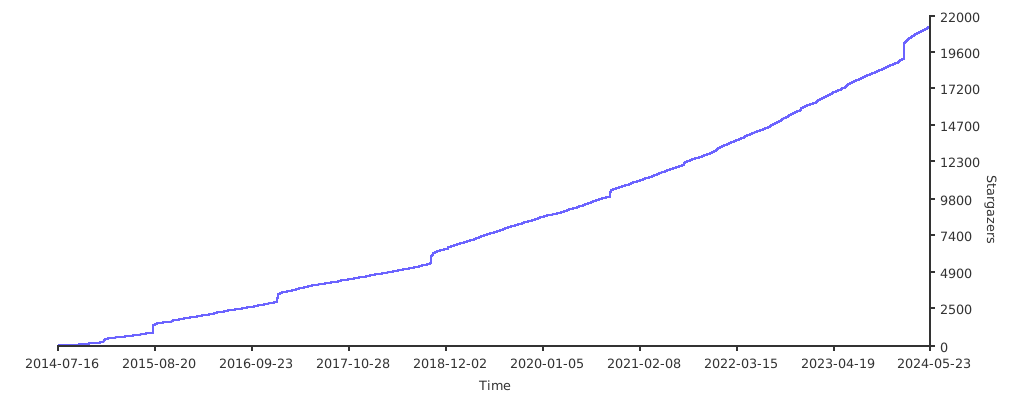
Stargazers over time