Chris LuandGitHub
8c7d714d5e
Chris LuandGitHub
8c7d714d5e
* iceberg: skip tables the maintenance worker does not own

A Lance dataset registered through the Lance namespace's Iceberg REST adapter
arrives as an Iceberg table with a placeholder schema and table_type=lance, and
keeps its fragments under data/ - the same subdirectory the orphan cleaner
walks. Every fragment is unreferenced by the Iceberg metadata, so a maintenance
pass deletes the dataset. Views share the entry shape and were only skipped
because parsing their metadata happened to fail first.

Gate the scan and the execution path on the entry actually being an Iceberg
table. Maintenance is off by default, so this was latent rather than live.

Claude-Session: https://claude.ai/code/session_01Rkp1Mw5E89Jp6dzJFYiMrm

* s3tables: let a table declare a format the catalog does not interpret

CreateTable accepted ICEBERG and nothing else. A Lance table has no metadata
file for the catalog to maintain - the entry records a name and the dataset
root, and the client owns everything under it - so accept LANCE, and carry the
declared format on the entry instead of hardcoding it back on the way out.

ListTables now reports format and metadataLocation, so listing a catalog that
holds both kinds takes one pass rather than a GetTable per row. AWS omits both
fields; adding them is additive.

Claude-Session: https://claude.ai/code/session_01Rkp1Mw5E89Jp6dzJFYiMrm

* s3tables: move the in-memory filer into its own package

The Lance namespace tests need the same harness, and copying it would leave two
of them to keep in step. Extracted as it was, plus the two fidelity gaps that
only surface once a paginating caller uses it: ListEntries ignored
startFromFileName and limit, so a caller that paginates re-read the first page
until it hit its own cap and reported the same entry over and over, and
GetFilerConfiguration was missing, which CreateTableBucket needs to resolve the
buckets directory.

Claude-Session: https://claude.ai/code/session_01Rkp1Mw5E89Jp6dzJFYiMrm

* lance: serve the Lance Namespace REST spec

A second catalog surface beside the Iceberg one, over the same table buckets:
the namespace and table metadata operations, the $-delimited identifier codec,
the spec's numeric error model, the directory-catalog marker files, and
storage_options vending through the STS path the Iceberg catalog already uses.
Listens on -port.lance, 9101 by default, and inherits ARNs, policies and tags
from the storage layer, so a Lance table needs no second permission model.

Identifiers map bucket / namespace / table onto the three levels Lance clients
already use, which is why there is no warehouse selector to invent. The data
plane needs Lance format support that does not exist in Go and answers with the
spec's Unsupported code rather than a bare 404.

Two things it deliberately will not do: create a table bucket as a side effect
of creating a namespace inside one, since a bucket carries its own policy and
lifecycle, and resolve an Iceberg table's location for a Lance client, which
would hand it a table another engine owns.

The design note this follows is in design-lance-catalog.md, including the
.lance directory suffix it proposed and this does not implement.

Claude-Session: https://claude.ai/code/session_01Rkp1Mw5E89Jp6dzJFYiMrm

* mini: give the Lance port the same treatment as the Iceberg one

The flag was registered but nothing else knew about it, so mini would start the
server without reserving its port, waiting for it, or saying where it is. Adds
it to the startup service list, the conflict resolver, the gRPC allocator's
reserved set, the readiness wait, the stop reporting and the banner.

The admin server still takes only the Iceberg port, because there is no Lance
page for it to link to.

Claude-Session: https://claude.ai/code/session_01Rkp1Mw5E89Jp6dzJFYiMrm

* lance: stop deregister and repoint from deleting the dataset

Deregistering preserves data by definition, and this did the opposite: the
catalog entry is the dataset directory, so DeleteTable took the files with it.
Registering over an existing name had the same shape, destroying the dataset
the name used to hold. Found by driving the running server rather than the
in-memory filer, where both looked like success because the table did stop
being listed.

Deregistering is now a state on the entry - the marker file hides it, and
declaring or registering the name again brings it back. Repointing a name at
another dataset is an UpdateTable against the version token, so neither dataset
loses files. Drop is left alone; it is the operation that does remove data.

The storage endpoint now falls back to the advertised -ip where the Iceberg
derivation gives up. An Iceberg client brings its own s3.endpoint and
advertising the wrong one hijacks it, but storage_options is the only place a
Lance client learns where the store is, and without it object_store quietly
talks to real AWS.

Claude-Session: https://claude.ai/code/session_01Rkp1Mw5E89Jp6dzJFYiMrm

* s3tables: refuse to create a table over one of another format

Creating a table that already exists is idempotent, and that path returned the
existing table without looking at its format. A Lance declare over an Iceberg
table answered 200 and handed back a directory Iceberg owns, so the client
would write its dataset on top. The view check immediately above it already
guards the same class of collision.

Claude-Session: https://claude.ai/code/session_01Rkp1Mw5E89Jp6dzJFYiMrm

* s3tables: let a table bucket hold a format other than Iceberg

The S3 door validated every object written into a table bucket against
Iceberg's file layout, so a Lance client could not write its dataset at all: it
got 403 on data/*.lance, on _versions/, and on the _transactions/ directory it
turned out to write as well. Table buckets were only neutral containers by
intention; in practice they were Iceberg-shaped and enforced as such.

The allowed set is now the union of what the supported formats write, because
the validator runs where the table's format is not in hand. Underscore-prefixed
directories are treated as belonging to the format, since enumerating them
means guessing at the next one - _transactions is exactly the one this missed -
and their contents are checked only for traversal. Iceberg writes none of them,
so it loses nothing. Marker files at the table root are admitted too, which the
namespace/table/dir/file shape had rejected as too shallow.

Describe also honours the request-body spellings of with_table_uri,
load_detailed_metadata and check_declared. The spec puts them in the query
string, but real clients send both.

Claude-Session: https://claude.ai/code/session_01Rkp1Mw5E89Jp6dzJFYiMrm

* design: record what the implementation found

The table bucket being an Iceberg-shaped container, enforced at the S3 door,
was the premise this design never questioned and the one that had to change
before anything worked end to end.

Claude-Session: https://claude.ai/code/session_01Rkp1Mw5E89Jp6dzJFYiMrm

* iceberg: prove the data loss the foreign-format guard prevents

The guard landed with a unit test for the predicate and nothing showing what it
saves. These seed what the Lance namespace's Iceberg REST adapter actually
leaves behind - an Iceberg table with a placeholder schema and table_type=lance
whose directory holds a Lance dataset - and assert both halves: orphan
collection does flag the dataset's fragments, because the Iceberg metadata
beside them references nothing, and the scan never reaches the table. An
ordinary Iceberg table in the same shape is still scanned, so the guard is not
just skipping everything.

Confirmed against a running gateway first: our Iceberg catalog accepts the
adapter's registration, and a real Lance client then writes a dataset into that
table's location.

Claude-Session: https://claude.ai/code/session_01Rkp1Mw5E89Jp6dzJFYiMrm

* s3tablestest: make the in-memory filer safe to race against

Two gaps that only matter once a test drives concurrent writers, which is what
an exclusive create has to be tested with: the entry map had no lock, and
CreateEntry ignored O_EXCL entirely, so both writers of the same name would
have won and the test would have passed while proving nothing.

The BeforeUpdate hook runs before the lock is taken. Its whole purpose is to
land a competing write in a handler's read-to-write window, and that write
needs the lock the hook would otherwise be holding.

Claude-Session: https://claude.ai/code/session_01Rkp1Mw5E89Jp6dzJFYiMrm

* lance: make the namespace an external manifest store

Lance commits a version by writing _versions/{v}.manifest with
put-if-not-exists. The S3 layer in front of this same filer evaluates
If-None-Match by looking the entry up and then writing without a precondition,
so two writers can both pass the check and one commit is lost. The filer itself
has the primitive: CreateEntry with o_excl.

Adds the four version operations a Lance client actually calls - create, list,
describe and batch-delete - recording one entry per version under
_lance_versions/, and advertises managed_versioning so the client routes its
commits here. Reserving a version is the exclusive create, so exactly one of
several racing writers wins and the rest rebase.

Off by default, behind -lance.managedVersioning. Turning it on moves where a
table's version history lives, and a reader that does not come through this
namespace no longer sees all of it; that is the operator's call, not a default.

Claude-Session: https://claude.ai/code/session_01Rkp1Mw5E89Jp6dzJFYiMrm

* design: record what managed versioning does and does not reach

The first commit through a namespace-backed store works and is recorded the way
the protocol specifies. Later commits do not, because lance 4.0.0 refuses
put_if_exists on that path in its own code, so the feature is capped upstream
rather than here.

Claude-Session: https://claude.ai/code/session_01Rkp1Mw5E89Jp6dzJFYiMrm

* test: integration tests for the Lance namespace

Everything this surface got wrong so far - a deregister that deleted the
dataset, an S3 door that refused every Lance file, a version reservation that
could not actually be exclusive - passed against an in-memory filer first. So
these run against a live gateway, and where the claim is about data they check
storage rather than visibility.

Five Go tests on the shared harness: namespace and table lifecycle including
that deregister keeps the bytes and drop removes them, that a Lance client
cannot resolve or declare over an Iceberg table, that a Lance dataset's files
get past the table-bucket layout guard while junk still does not, and that
eight writers racing for one version produce exactly one winner.

One Docker-gated test drives the real Lance client, which is the only way to
check that the location and storage_options the namespace vends are between
them enough to write and read a dataset. It overrides the endpoint with the
container's view of the same gateway, because the shared harness binds a
wildcard address and so vends none.

The harness gains a Lance port and turns managed versioning on; the flag
touches nothing outside that surface.

Claude-Session: https://claude.ai/code/session_01Rkp1Mw5E89Jp6dzJFYiMrm

* s3tables: a directory with no namespace metadata is a missing namespace

Three callers resolved a namespace by reading its metadata attribute and each
tested only for a missing entry, so a directory that carried no metadata came
back as an internal error saying "attribute not found". Creating a table under
a namespace that does not exist answered 500.

Collapses the three copies into one helper that reports both conditions as
absent, which is what they are: a directory without namespace metadata is not a
namespace.

Claude-Session: https://claude.ai/code/session_01Rkp1Mw5E89Jp6dzJFYiMrm

* iceberg: stop reporting storage-layer refusals as server faults

writeManagerError recognised a missing table bucket and sent everything else to
500, so a missing namespace, a duplicate name and a commit conflict all reached
the client as InternalServerError with nothing to act on. Creating a table in a
namespace that does not exist is the case that turned up: 500 where the spec
wants 404 NoSuchNamespaceException.

Maps the storage error types onto the exception names this package already
uses, and keeps the existing bucket message, which explains how to select a
table bucket.

Claude-Session: https://claude.ai/code/session_01Rkp1Mw5E89Jp6dzJFYiMrm

* iceberg: skip a foreign-format table by name, not by failing to parse it

A table the namespace created as LANCE carries no Iceberg metadata, so the
worker skipped it only because the parse failed, and logged that as damaged
metadata. The catalog records the format on the entry and this never read it.

Reading it turns an accident into a decision, and separates a mixed catalog
from a corrupt one in the logs. The property check beside it still covers the
other shape: a real Iceberg table wearing table_type=lance, which is what the
Lance namespace's Iceberg REST adapter writes.

Claude-Session: https://claude.ai/code/session_01Rkp1Mw5E89Jp6dzJFYiMrm

* design: answer whether a Lance table needs maintenance

It does, and index optimization has no Iceberg equivalent: rows written after
an index was built are not covered by it, so a vector search quietly misses
them. None of the three jobs can run in the Go worker, and there is no useful
subset, because deciding what an old version still references means parsing
Lance manifests. Version cleanup at least has an answer that needs nothing from
us - Lance can enable it on the dataset itself.

Claude-Session: https://claude.ai/code/session_01Rkp1Mw5E89Jp6dzJFYiMrm

* design: the Lance maintenance worker is a plugin worker, in Rust

Framing it as a sidecar was wrong. plugin.proto already defines a
language-agnostic gRPC contract for external maintenance workers, and
"weed worker -admin=..." is the Go reference implementation of it from outside
the admin process. seaweed-volume already compiles protos out of weed/pb with
tonic_build, so a Lance worker is that build plus plugin.proto and the lance
crate.

Scheduling, retries, dedupe, progress and the admin settings page all come from
the protocol: a worker that answers RequestConfigSchema with a descriptor gets
its configuration form rendered without a line of Go.

The data plane is the part that genuinely does need a process answering HTTP,
and this had the two conflated.

Claude-Session: https://claude.ai/code/session_01Rkp1Mw5E89Jp6dzJFYiMrm

* seaweed-worker: Rust plugin worker workspace, with Lance as the first one

plugin.proto is language-agnostic and the Rust toolchain was already in the
tree, so a Lance maintenance worker needs no new integration surface: core is
the contract and nothing else, and a worker crate beside it supplies handlers
and a binary. A second worker is a new member here rather than a fork of the
protocol, which is why this is seaweed-worker and not seaweed-lance-worker.

Verified against a running admin: it connects, is accepted, and admin prefetches
descriptors for lance_compact, lance_optimize_indices and lance_cleanup_versions,
so their settings pages render from the Rust side without a line of Go. The
stream stays up across heartbeats.

The job bodies are stubs that report failure. Doing the work means adding the
lance crate and opening the dataset, and claiming success before that would be
worse than saying so.

Two things running it caught that reading the proto did not: the admin address
has to be converted to the gRPC port the way pb.ServerToGrpcAddress does, or the
dial fails as an h2 frame error; and the generated field names differ from the
Go ones in several places, so JobCompleted carries success rather than a state
enum.

Claude-Session: https://claude.ai/code/session_01Rkp1Mw5E89Jp6dzJFYiMrm

* lance worker: implement compaction

Detection lists tables from the namespace, opens each one, and proposes a job
for any with more fragments than the policy allows; opening a dataset reads its
manifest and not its data, so a sweep stays cheap. Execution re-resolves the
table rather than trusting what detection saw - it may have been repointed, and
the vended credentials expire - then compacts and reports the fragment counts
either side.

Verified against a live gateway: a twelve-fragment dataset became one fragment
with all twelve rows intact. The test drives the handler directly and skips
unless WEED_LANCE_NAMESPACE names a namespace, the way the Go integration tests
skip without Docker.

Running it turned up a gap the design had not: a gateway without STS vends no
credentials at all, so the worker could not open anything and detection quietly
proposed nothing. --access-key/--secret-key are the fallback, and whatever the
namespace vends still wins over them.

Two API assumptions did not survive contact either. Datasets open through
DatasetBuilder::with_storage_options, not ReadParams, and lance 10's
ObjectStoreParams has no storage_options field at all.

Claude-Session: https://claude.ai/code/session_01Rkp1Mw5E89Jp6dzJFYiMrm

* lance worker: implement index optimization and version cleanup

Index optimization is the job with no Iceberg equivalent: rows appended after
an index was built are invisible to a search of it until this runs. Detection
reads num_unindexed_rows from each index's statistics and proposes a table once
more rows sit outside its indices than the budget allows; a table with no
indices is skipped, which is different from one whose indices have fallen
behind.

Cleanup applies a retention window, refusing rather than silently dropping a
tagged version, and leaving unverified files alone because they may belong to a
commit still in flight.

Both verified against a live gateway: 512 uncovered rows became 0, and a
fourteen-version table lost its old ones. Each test now seeds what it needs,
including building an IVF_PQ index and appending rows outside it. The first
version of these depended on state a script had left, so the second run found
the work already done and asserted nothing - a test that passes by doing
nothing is worse than no test.

Claude-Session: https://claude.ai/code/session_01Rkp1Mw5E89Jp6dzJFYiMrm

* lance: answer an empty catalog with an empty list, not null

ListAllTables built its result from a nil slice, so a namespace holding no
tables answered {"tables":null} on a field the spec marks required. A generated
client may decode that differently from an empty list. Found running the
namespace on a dev box, where the catalog was empty.

Claude-Session: https://claude.ai/code/session_01Rkp1Mw5E89Jp6dzJFYiMrm

* admin: give Lance maintenance its own scheduler lane

Lane assignment is a hardcoded map, so the three lance_* job types fell through
to the default lane. That lane serialises its work under the cluster admin lock
because volume management shares global state, which would queue a table's
compaction behind volume balancing for no reason - Iceberg has its own
lock-free lane for exactly this.

Adds the lane, maps the three job types to it, and puts it in the sidebar
beside Iceberg and Lifecycle. The lane routes were already generic, so only the
nav was hand-written.

The lane-coverage test spelled out the three known lanes, so a fourth failed
it. It now checks against AllLanes(), which is the property it was reaching for
and does not need editing next time.

Found by connecting the Rust worker to a real admin: it registered fine and its
job types were known, but they were filed under "default" and had no page.

Claude-Session: https://claude.ai/code/session_01Rkp1Mw5E89Jp6dzJFYiMrm

* lance worker: log what detection saw

"Detection proposed nothing" and "the worker could not read the table" look
identical from the admin side, and the second is what a missing credential
produces. One line per table separates them.

Claude-Session: https://claude.ai/code/session_01Rkp1Mw5E89Jp6dzJFYiMrm

* lance worker: fix a leaked heartbeat and a silent reconnect loop

spawn_heartbeat returned a handle to an empty task rather than the ticker it
had just spawned, so aborting it aborted nothing and every reconnect left
another heartbeat running against a dead channel.

A stream that admin closes cleanly is not an error, but reconnecting in silence
hides why. Two workers sharing an id evict each other forever and the log shows
nothing but a login every five seconds - which is exactly how this presented on
a dev box, and it took a look at the admin's own log to see it. The message now
names the id to check.

Claude-Session: https://claude.ai/code/session_01Rkp1Mw5E89Jp6dzJFYiMrm

* lance: a namespace cannot be created without its parent

Storage keeps a namespace's parts flattened, so creating "a.b" with no "a"
was accepted and left an intermediate that only existed inside a name. Listing
derives child names by slicing those parts, so it reported "a", while describe
and exists on "a" both answered 404 - a client walking the tree got a 404 on
something the listing had just handed it.

The spec asks for NamespaceNotFound when the parent is missing, which is also
what keeps listing and describe telling the same story.

Namespaces created through the S3 Tables API still bypass this, so listing
keeps deriving intermediates rather than hiding whatever is already there.

Claude-Session: https://claude.ai/code/session_01Rkp1Mw5E89Jp6dzJFYiMrm

* admin: say why a non-Iceberg table shows no schema

The table pages read Iceberg metadata for schema and snapshots, and a Lance
table has none, so both panels rendered "No schema available" - which reads as
an empty table rather than a table this page cannot describe. The dataset
behind the one that prompted this holds 1024 rows.

The format is already on the entry and shown two rows above, so the empty
states now use it: the catalog records where a LANCE table lives, not what is
in it.

Reading the schema for real needs Lance format code, which is the same wall as
the data plane.

Claude-Session: https://claude.ai/code/session_01Rkp1Mw5E89Jp6dzJFYiMrm

* seaweed-worker: run rustfmt over the workspace

Committed the crates unformatted, so `cargo fmt --all --check` failed on
files nothing had touched since.

Claude-Session: https://claude.ai/code/session_01Rkp1Mw5E89Jp6dzJFYiMrm

* plugin: let a worker report what it saw about an object

Admin cannot read a Lance table: it knows where the dataset lives and
nothing else, so the details page had a location and two empty panels.
The worker already opens every dataset during detection to decide whether
it needs compacting, so it knows the schema, the row count and the
fragment count at that moment. It just had no way to say so.

Add a WorkerObservations body to the worker stream. Admin caches the last
observation per object and serves it back, timestamped, for display;
nothing schedules from it. The Lance compaction sweep reports what it
opened, and the S3 Tables details page fills its schema panel from the
cache when it has no metadata of its own, badged with when the worker
looked and which worker it was.

Nothing about this is Lance-specific past the reporting side, which is
the point: any format admin cannot parse can describe itself the same way.

Claude-Session: https://claude.ai/code/session_01Rkp1Mw5E89Jp6dzJFYiMrm

* design: record the observation channel

Claude-Session: https://claude.ai/code/session_01Rkp1Mw5E89Jp6dzJFYiMrm

* plugin: ask a worker for sample rows of a table admin cannot read

Browse Data reads an Iceberg table's Parquet files directly, so it shows
real rows. For a Lance table it showed "Table has no Iceberg metadata"
and an empty grid, because there is no Go Lance reader and never will be
one worth maintaining.

The worker has the reader. Add RequestObjectPreview / ObjectPreviewResponse
to the stream, mirroring the config-schema round trip that already exists,
and give the Rust worker a PreviewProvider that scans the dataset and
formats the rows with Arrow's own formatter, so a vector column reads as a
vector. Admin picks the worker from the observation store: whichever one
last described this table is the one that can read it.

Unlike an observation the rows are not cached. They are the table's data
rather than a description of it, and a copy sitting in admin would be both
stale and nobody's business. The page fetches on load, bounded at 200 rows
and a 15 second round trip, and drops the snapshot and data-file panels
that only mean something for Iceberg.

Claude-Session: https://claude.ai/code/session_01Rkp1Mw5E89Jp6dzJFYiMrm

* design: record the preview channel

Claude-Session: https://claude.ai/code/session_01Rkp1Mw5E89Jp6dzJFYiMrm

* test: disable the lance listener when two gateways share a host

* test: keep AllocatePorts away from the lance default port

* s3tables: let a table bucket declare the format it holds

A bucket is a catalog, and a catalog serves one protocol. Format was
recorded per table, so nothing could answer "where do I point a client at
this bucket" without opening a table first, and an empty bucket had no
answer at all.

CreateTableBucket takes an optional format, stored with the rest of the
bucket metadata and returned by Get and List. Empty means ICEBERG, which
is what AWS S3 Tables serves and therefore what an SDK that has never
heard of the field means. CreateTable refuses a table of another format,
and CreateView refuses outright in a bucket that is not Iceberg, since a
view is Iceberg metadata.

Buckets that already exist carry no declaration and keep accepting
anything, so nothing is migrated and nothing that worked stops working.
The Lance namespace declares LANCE for the buckets it creates, which is
what stops one of them being described to a client as an Iceberg catalog.

Claude-Session: https://claude.ai/code/session_01Rkp1Mw5E89Jp6dzJFYiMrm

* admin: take the Lance port the way it takes the Iceberg one

The UI cannot name the endpoint that serves a Lance bucket without it,
and every format-aware page below needs to.

Claude-Session: https://claude.ai/code/session_01Rkp1Mw5E89Jp6dzJFYiMrm

* admin: show which format a table bucket holds

The bucket list printed an Iceberg endpoint for every bucket, including
ones holding Lance datasets, where that endpoint serves nothing. It was
the most visible place the UI assumed one format.

The list gains a Format column and its endpoint column follows the
bucket's declaration. The banner names both endpoints rather than
asserting everything is Iceberg, and says so only for the servers that
are actually running. Create Bucket picks a format with two cards rather
than a dropdown, since what matters is not the name but which clients can
read the result, and the endpoint under them updates as you choose so the
operator leaves the modal knowing where to point one.

A bucket from before the declaration existed shows "unset" in an outline
badge, explained on hover. It is a fact about the bucket's age, not a
fault, so nothing nags about it.

Claude-Session: https://claude.ai/code/session_01Rkp1Mw5E89Jp6dzJFYiMrm

* admin: carry the bucket's format into the pages inside it

Namespaces and tables are reached through a bucket, so both now say which
catalog they belong to rather than making you go back up to find out. The
tables list gains a Format column and a Rows column filled from what a
worker last observed, since for a format admin cannot read that is the
only row count there is; a table nothing has looked at shows a dash, not
a zero.

Create Table stops offering a choice the bucket has already made: in a
declared bucket the format is fixed and says why, and only an undeclared
one still offers both. Before this the select had exactly one option,
hardcoded, which made a Lance table impossible to create from the UI at
all.

Claude-Session: https://claude.ai/code/session_01Rkp1Mw5E89Jp6dzJFYiMrm

* admin: let the table page speak the table's own format

Partitions and Snapshot History are Iceberg's shape. Rendering them empty
for a Lance table reads as a fault; a Lance table has neither, and says
so by not showing them. In their place is a Versions panel, which is what
that format calls its history, carrying the worker's timestamp so it is
clear the numbers are a cached look rather than something read live.

The breadcrumb carries the format badge, so the page names what it is
looking at before you read a panel and wonder why it is empty.

Claude-Session: https://claude.ai/code/session_01Rkp1Mw5E89Jp6dzJFYiMrm

* admin: show how to connect to either catalog, and group the two format workers

The client examples on the buckets page were Iceberg's alone, so the one
thing an operator wants after creating a Lance bucket - what to type to
reach it - was not written down anywhere in the UI. Both formats now get
a pair of snippets, and only for a server that is running.

In the Workers menu, Iceberg moves below Lifecycle so it sits next to
Lance: the two table-format workers together, the two cluster-wide ones
above them.

Claude-Session: https://claude.ai/code/session_01Rkp1Mw5E89Jp6dzJFYiMrm

* shell: create a table bucket of either format

s3tables.bucket -create takes -format, so a Lance bucket can be made
without going through the UI. The integration harness passes it too: its
Lance tests were creating Iceberg buckets and getting away with it only
because nothing checked.

Claude-Session: https://claude.ai/code/session_01Rkp1Mw5E89Jp6dzJFYiMrm

* design: record that a bucket declares its format

Claude-Session: https://claude.ai/code/session_01Rkp1Mw5E89Jp6dzJFYiMrm

* lance: drop managed versioning; the store already orders commits

The namespace offered itself as an external manifest store, so that a
commit could reserve a version through a real put-if-not-exists. That was
designed around a gateway that no longer exists: If-None-Match: * is
reduced to a filer WriteCondition and evaluated at the object's owner
under its per-path lock, or under the object write lock on the fallback
path. Sixteen writers racing one fresh key get a single 200 and fifteen
412s, every time.

Lance needs nothing else. commit_handler_from_url hands every s3:// dataset
a ConditionalPutCommitHandler, which puts with PutMode::Create, which
object_store sends as If-None-Match: *. So the feature solved a problem
this store does not have, while moving a table's version history out of
the dataset and into the catalog - and lance could not use it past the
first commit anyway, since its own namespace-backed store answers
"put_if_not_exists is not supported" to the second.

The version operations answer Unsupported with the rest, managed_versioning
is false, and the flag is gone. In place of the reserve-once test there is
one that races eight writers at the manifest key through S3, which is the
path a commit actually takes.

Claude-Session: https://claude.ai/code/session_01Rkp1Mw5E89Jp6dzJFYiMrm

* lance worker: honour the version floor, the slot limits, and a shutdown

Five findings from review, all of them things the worker claimed to do and
did not.

The version floor was checked when a cleanup job was proposed and ignored
when it ran, so a table whose versions had aged past the retention window
in between could be taken below the count the operator asked to keep.
Execution now computes the floor itself and passes it as before_version;
CleanupPolicy ANDs its clauses, so a version has to be both too old and
below the floor to go. Both settings are clamped to the range the form
offers, since Duration::hours panics on a large enough value and a
negative min-versions wraps to a huge usize.

Admin's shutdown was answered by returning from the stream, which the
reconnect loop read as a healthy close and logged straight back in: the
worker could not be stopped. serve_once now says which of the two
happened.

The advertised concurrency limits bounded nothing - every request spawned
a task - and the heartbeat reported zero slots in use whatever was
running. Both now go through semaphores sized from the limits, with the
permits held for the life of the request and reported in the heartbeat.

A namespace call had no timeout, so a gateway that accepted the connection
and went quiet held a detection slot forever. And one table whose stats
could not be read failed the whole sweep, losing the proposals for every
table already scanned; it is now skipped and warned about, like a table
that cannot be opened.

The tests drove one shared catalog concurrently, which is why one of them
asserted "no proposals at all" and passed by luck. They now take a lock
and judge only their own tables.

Claude-Session: https://claude.ai/code/session_01Rkp1Mw5E89Jp6dzJFYiMrm

* admin: fix the review findings on the format-aware pages

The endpoint hint in Create Bucket built its HTML by concatenating the
bucket name the operator is typing, so a name like <img onerror=...> ran
in the admin origin as they typed it. It is built from DOM nodes now.

A preview reply looked its channel up under the lock and then sent outside
it, which Shutdown can close in between: a Gosched in that gap panics with
"send on closed channel" every time. The send now happens under the lock.

Observations were looked up by path alone, so a table dropped and remade
in another format at the same path was described by the observation left
behind. Lookups now have to agree on the format.

Also: the Lance namespace caps a request body rather than reading whatever
arrives; the details action no longer says "Iceberg" over a Lance table;
mini stops advertising a catalog port when it is not running S3; a format
whose server this cluster does not run cannot be picked in the modal or
accepted by the API, since a bucket nothing can reach is not worth
creating; and the unused catalogPortFor helper is gone.

Claude-Session: https://claude.ai/code/session_01Rkp1Mw5E89Jp6dzJFYiMrm

* lance worker: let the control stream use mTLS

The channel was hardcoded to http://, so off loopback the stream carried
preview rows and execution commands in the clear - and a cluster with grpc
TLS turned on would refuse the worker outright.

--tls-ca, --tls-cert and --tls-key take the same certificates the Go
worker reads from the [grpc.worker] section of security.toml, and must be
given together: a CA on its own would quietly mean one-way TLS, which a
mutual setup rejects anyway. Without them the stream stays plaintext,
which is what the Go worker also does when nothing is configured.

Claude-Session: https://claude.ai/code/session_01Rkp1Mw5E89Jp6dzJFYiMrm

* lance: answer null properties rather than an empty map

The catalog does not keep a table's properties. Declare echoed the
request's back and describe answered {}, both of which claim they were
stored and are empty. Null says the catalog does not keep them, which is
what the spec distinguishes and what is true here.

Claude-Session: https://claude.ai/code/session_01Rkp1Mw5E89Jp6dzJFYiMrm

* lance worker: test the slot accounting

The heartbeat reporting and the waiting are the two things the semaphores
are for, and neither is observable from outside without catching a sweep
mid-flight.

Claude-Session: https://claude.ai/code/session_01Rkp1Mw5E89Jp6dzJFYiMrm

* test: fix the mixed-format catalog test, and name the binary it drives

The integration suite passed locally and failed in CI on
TestLanceRefusesIcebergTables. Both were right: CI builds the binary
first, my tree had one from the day before, so locally the test drove a
gateway with no format enforcement at all.

The test itself no longer holds as written. It made a bucket, put an
Iceberg table in it, and checked the Lance surface hid it - but a bucket
that declares LANCE now refuses the Iceberg table outright. The invariant
still matters from the other side, so it starts from an Iceberg bucket
instead: Lance must not describe or list a table whose format it does not
serve, and must refuse to declare one beside it.

The harness now prints which weed binary it is about to run and when that
was built. `make test` rebuilds first; a plain `go test` will happily
drive a weeks-old binary and report a pass for code it never ran, which is
exactly what happened here.

Also make the row-limit conversion in the preview request explicitly
bounded: CodeQL flagged the int-to-int32 conversion, and clamping by
reassignment beforehand is not a form it recognises.

Claude-Session: https://claude.ai/code/session_01Rkp1Mw5E89Jp6dzJFYiMrm

* lance: prove concurrent commits are kept, and preselect the only format on offer

Two more from review.

The commit test asserted that exactly one writer wins the conditional PUT,
which is the mechanism, not the claim. The claim is that nothing is lost:
the losers see the conflict, rebase and commit again. So there is now a
test that has eight writers append to one dataset at once and counts the
rows afterwards - all eight batches survive. That is also the sequence
managed versioning could not finish, since its store refuses the second
commit outright.

And when Iceberg's endpoint is not running, the format picker offered two
options with neither selected, so Create Bucket submitted no format at
all, fell back to ICEBERG, and was refused by the guard added last round.
Lance is preselected when it is the only format this cluster serves.

Claude-Session: https://claude.ai/code/session_01Rkp1Mw5E89Jp6dzJFYiMrm

* Clamp the remaining worker settings, and bootstrap buckets in a served format

Compaction and index optimization read their thresholds and cast straight
to usize and u64, so a negative arrives as an enormous number and turns
the threshold into "never": compaction and reindexing both go quiet with
nothing to say. The cleanup job was fixed last round; these are the same
bug. Clamped to the values that stay meaningful rather than to what the
form offers - zero uncovered rows is a real setting, meaning reindex as
soon as anything is not covered, so the floor there is zero and not the
form's thousand.

mini pre-creates the buckets named by -tableBucket, and did so without a
format, which now means Iceberg. Started with the Iceberg endpoint off
and the Lance one on, that left buckets nothing could reach and which
refused every Lance table. It takes the format from the endpoint that is
actually running, and creates nothing when neither is.

Claude-Session: https://claude.ai/code/session_01Rkp1Mw5E89Jp6dzJFYiMrm

* s3: allow-unordered is a listing parameter, not an unimplemented subresource

The guard that stops a bucket GET with an unknown subresource from being
answered with a listing does not know about allow-unordered, so it answers
501 NotImplemented - to a parameter the listing handlers already read and
already validate against delimiter.

This is why test_bucket_list_unordered and test_bucket_listv2_unordered
fail in the Ceph s3-tests suite. They fail on master too; this is not a
Lance change and can be taken on its own.

Claude-Session: https://claude.ai/code/session_01Rkp1Mw5E89Jp6dzJFYiMrm
SeaweedFS






Sponsor SeaweedFS via Patreon
SeaweedFS is an independent Apache-licensed open source project with its ongoing development made possible entirely thanks to the support of these awesome backers. If you'd like to grow SeaweedFS even stronger, please consider joining our sponsors on Patreon.
Your support will be really appreciated by me and other supporters!
Gold Sponsors




- Download Binaries for different platforms
- SeaweedFS on Slack
- SeaweedFS on Twitter
- SeaweedFS on Telegram
- SeaweedFS on Reddit
- SeaweedFS Mailing List
- Wiki Documentation
- SeaweedFS White Paper
- SeaweedFS Introduction Slides 2025.5
- SeaweedFS Introduction Slides 2021.5
- SeaweedFS Introduction Slides 2019.3
Table of Contents
- Quick Start
- Introduction
- Features
- Example: Using Seaweed Blob Store
- Architecture
- Compared to Other File Systems
- Dev Plan
- Installation Guide
- Disk Related Topics
- Benchmark
- Enterprise
- License
Quick Start
Quick Start with weed mini
Download the latest binary from https://github.com/seaweedfs/seaweedfs/releases and unzip the single weed (or weed.exe) file, or run go install github.com/seaweedfs/seaweedfs/weed@latest. Then start a ready-to-use S3 object store with credentials and a pre-created bucket in one command:
AWS_ACCESS_KEY_ID=admin \
AWS_SECRET_ACCESS_KEY=secret \
S3_BUCKET=my-bucket \
./weed mini -dir=/data
That's it — the S3 endpoint is at http://localhost:8333, my-bucket already exists, and admin/secret are valid credentials. S3_BUCKET accepts a comma-separated list (e.g. raw,processed); use S3_TABLE_BUCKET for S3 Tables (Iceberg) buckets. Drop any of the env vars to skip that piece (no AWS keys → S3 runs in unauthenticated "Allow All" mode for development).
The same command starts everything else too:
- S3 Endpoint: http://localhost:8333
- Master UI: http://localhost:9333
- Volume Server: http://localhost:9340
- Filer UI: http://localhost:8888
- WebDAV: http://localhost:7333
- Admin UI: http://localhost:23646
macOS: if the binary is quarantined, run
xattr -d com.apple.quarantine ./weedfirst.
Perfect for development, testing, learning SeaweedFS, and single-node deployments. To scale out, add more volume servers by running weed volume -dir="/some/data/dir2" -master="<master_host>:9333" -port=8081 locally, on another machine, or on thousands of machines.
Quick Start for S3 API on Docker
docker run -p 8333:8333 \
  -e AWS_ACCESS_KEY_ID=admin \
  -e AWS_SECRET_ACCESS_KEY=secret \
  -e S3_BUCKET=my-bucket \
  chrislusf/seaweedfs
Same behavior as the weed mini command above — the S3 endpoint is at http://localhost:8333 with my-bucket pre-created. Drop the env vars to run anonymously for development.
Introduction
SeaweedFS is a simple and highly scalable distributed file system. There are two objectives:
- to store billions of files!
- to serve the files fast!
SeaweedFS started as a blob store to handle small files efficiently. Instead of managing all file metadata in a central master, the central master only manages volumes on volume servers, and these volume servers manage files and their metadata. This relieves concurrency pressure from the central master and spreads file metadata into volume servers, allowing faster file access (O(1), usually just one disk read operation).
There is only 40 bytes of disk storage overhead for each file's metadata. It is so simple with O(1) disk reads that you are welcome to challenge the performance with your actual use cases.
SeaweedFS started by implementing Facebook's Haystack design paper. Also, SeaweedFS implements erasure coding with ideas from f4: Facebook’s Warm BLOB Storage System, and has a lot of similarities with Facebook’s Tectonic Filesystem and Google's Colossus File System
On top of the blob store, optional Filer can support directories and POSIX attributes. Filer is a separate linearly-scalable stateless server with customizable metadata stores, e.g., MySql, Postgres, Redis, Cassandra, HBase, Mongodb, Elastic Search, LevelDB, RocksDB, Sqlite, MemSql, TiDB, Etcd, CockroachDB, YDB, etc.
SeaweedFS can transparently integrate with the cloud. With hot data on local cluster, and warm data on the cloud with O(1) access time, SeaweedFS can achieve both fast local access time and elastic cloud storage capacity. What's more, the cloud storage access API cost is minimized. Faster and cheaper than direct cloud storage!
SeaweedFS also ships a built-in Iceberg REST Catalog, turning the same cluster into a self-contained lakehouse. Spark, Trino, Dremio, DuckDB, and RisingWave can query Iceberg tables directly — no Hive Metastore, Glue, or external catalog service required. Storage and table metadata live in one system, simplifying on-prem and small-team analytics stacks.
Features
Additional Blob Store Features
- Support different replication levels, with rack and data center aware.
- Automatic master servers failover - no single point of failure (SPOF).
- Automatic compression depending on file MIME type.
- Automatic compaction to reclaim disk space after deletion or update.
- Automatic entry TTL expiration.
- Flexible Capacity Expansion: Any server with some disk space can add to the total storage space.
- Adding/Removing servers does not cause any data re-balancing unless triggered by admin commands.
- Optional picture resizing.
- Support ETag, Accept-Range, Last-Modified, etc.
- Support in-memory/leveldb/readonly mode tuning for memory/performance balance.
- Support rebalancing the writable and readonly volumes.
- Customizable Multiple Storage Tiers: Customizable storage disk types to balance performance and cost.
- Transparent cloud integration: unlimited capacity via tiered cloud storage for warm data.
- Erasure Coding for warm storage Rack-Aware 10.4 erasure coding reduces storage cost and increases availability. Enterprise version can customize EC ratio.
Filer Features
- Filer server provides "normal" directories and files via HTTP.
- File TTL automatically expires file metadata and actual file data.
- Mount filer reads and writes files directly as a local directory via FUSE.
- Filer Store Replication enables HA for filer meta data stores.
- Active-Active Replication enables asynchronous one-way or two-way cross cluster continuous replication.
- Amazon S3 compatible API accesses files with S3 tooling.
- Hadoop Compatible File System accesses files from Hadoop/Spark/Flink/etc or even runs HBase.
- Async Replication To Cloud has extremely fast local access and backups to Amazon S3, Google Cloud Storage, Azure, BackBlaze.
- WebDAV accesses as a mapped drive on Mac and Windows, or from mobile devices.
- AES256-GCM Encrypted Storage safely stores the encrypted data.
- Super Large Files stores large or super large files in tens of TB.
- Cloud Drive mounts cloud storage to local cluster, cached for fast read and write with asynchronous write back.
- Gateway to Remote Object Store mirrors bucket operations to remote object storage, in addition to Cloud Drive
Data Lakehouse Features
- S3 Table Buckets expose a dedicated namespace for Iceberg tables with strict layout validation.
- Built-in Iceberg REST Catalog runs alongside the S3 endpoint — no external metastore needed.
- Native integrations with Apache Spark, Trino, Dremio, DuckDB, and RisingWave.
- Automated table maintenance: compaction, snapshot expiration, orphan removal, manifest rewriting.
- Granular IAM at the bucket, namespace, and table level via standard S3 bucket policies.
Kubernetes
- Kubernetes CSI Driver A Container Storage Interface (CSI) Driver.

- SeaweedFS Operator
Example: Using Seaweed Blob Store
By default, the master node runs on port 9333, and the volume nodes run on port 8080. Let's start one master node, and two volume nodes on port 8080 and 8081. Ideally, they should be started from different machines. We'll use localhost as an example.
SeaweedFS uses HTTP REST operations to read, write, and delete. The responses are in JSON or JSONP format.
Start Master Server
> ./weed master
Start Volume Servers
> weed volume -dir="/tmp/data1" -max=5  -master="localhost:9333" -port=8080 &
> weed volume -dir="/tmp/data2" -max=10 -master="localhost:9333" -port=8081 &
Write A Blob
A blob, also referred as a needle, a chunk, or mistakenly as a file, is just a byte array. It can have attributes, such as name, mime type, create or update time, etc. But basically it is just a byte array of a relatively small size, such as 2 MB ~ 64 MB. The size is not fixed.
To upload a blob: first, send a HTTP POST, PUT, or GET request to /dir/assign to get an fid and a volume server URL:
> curl http://localhost:9333/dir/assign
{"count":1,"fid":"3,01637037d6","url":"127.0.0.1:8080","publicUrl":"localhost:8080"}
Second, to store the blob content, send a HTTP multi-part POST request to url + '/' + fid from the response:
> curl -F file=@/home/chris/myphoto.jpg http://127.0.0.1:8080/3,01637037d6
{"name":"myphoto.jpg","size":43234,"eTag":"1cc0118e"}
To update, send another POST request with updated blob content.
For deletion, send an HTTP DELETE request to the same url + '/' + fid URL:
> curl -X DELETE http://127.0.0.1:8080/3,01637037d6
Save Blob Id
Now, you can save the fid, 3,01637037d6 in this case, to a database field.
The number 3 at the start represents a volume id. After the comma, it's one file key, 01, and a file cookie, 637037d6.
The volume id is an unsigned 32-bit integer. The file key is an unsigned 64-bit integer. The file cookie is an unsigned 32-bit integer, used to prevent URL guessing.
The file key and file cookie are both coded in hex. You can store the <volume id, file key, file cookie> tuple in your own format, or simply store the fid as a string.
If stored as a string, in theory, you would need 8+1+16+8=33 bytes. A char(33) would be enough, if not more than enough, since most uses will not need 2^32 volumes.
If space is really a concern, you can store the file id in the binary format. You would need one 4-byte integer for volume id, 8-byte long number for file key, and a 4-byte integer for the file cookie. So 16 bytes are more than enough.
Read a Blob
Here is an example of how to render the URL.
First look up the volume server's URLs by the file's volumeId:
> curl http://localhost:9333/dir/lookup?volumeId=3
{"volumeId":"3","locations":[{"publicUrl":"localhost:8080","url":"localhost:8080"}]}
Since (usually) there are not too many volume servers, and volumes don't move often, you can cache the results most of the time. Depending on the replication type, one volume can have multiple replica locations. Just randomly pick one location to read.
Now you can take the public URL, render the URL or directly read from the volume server via URL:
http://localhost:8080/3,01637037d6.jpg
Notice we add a file extension ".jpg" here. It's optional and just one way for the client to specify the file content type.
If you want a nicer URL, you can use one of these alternative URL formats:
 http://localhost:8080/3/01637037d6/my_preferred_name.jpg
 http://localhost:8080/3/01637037d6.jpg
 http://localhost:8080/3,01637037d6.jpg
 http://localhost:8080/3/01637037d6
 http://localhost:8080/3,01637037d6
If you want to get a scaled version of an image, you can add some params:
http://localhost:8080/3/01637037d6.jpg?height=200&width=200
http://localhost:8080/3/01637037d6.jpg?height=200&width=200&mode=fit
http://localhost:8080/3/01637037d6.jpg?height=200&width=200&mode=fill
Rack-Aware and Data Center-Aware Replication
SeaweedFS applies the replication strategy at a volume level. So, when you are getting a blob id, you can specify the replication strategy. For example:
curl http://localhost:9333/dir/assign?replication=001
The replication parameter options are:
000: no replication
001: replicate once on the same rack
010: replicate once on a different rack, but same data center
100: replicate once on a different data center
200: replicate twice on two different data center
110: replicate once on a different rack, and once on a different data center
More details about replication can be found on the wiki.
You can also set the default replication strategy when starting the master server.
Allocate Blob Key on Specific Data Center
Volume servers can be started with a specific data center name:
 weed volume -dir=/tmp/1 -port=8080 -dataCenter=dc1
 weed volume -dir=/tmp/2 -port=8081 -dataCenter=dc2
When requesting a blob key, an optional "dataCenter" parameter can limit the assigned volume to the specific data center. For example, this specifies that the assigned volume should be limited to 'dc1':
http://localhost:9333/dir/assign?dataCenter=dc1
Other Features
- No Single Point of Failure
- Insert with your own keys
- Chunking large files
- Collection as a Simple Name Space
Blob Store Architecture
Usually distributed file systems split each file into chunks. A central server keeps a mapping of filenames to chunks, and also which chunks each chunk server has.
The main drawback is that the central server can't handle many small files efficiently, and since all read requests need to go through the central master, so it might not scale well for many concurrent users.
Instead of managing chunks, SeaweedFS manages data volumes in the master server. Each data volume is 32GB in size, and can hold a lot of blobs. And each storage node can have many data volumes. So the master node only needs to store the metadata about the volumes, which is a fairly small amount of data and is generally stable.
The actual blob metadata, which are the blob volume, offset, and size, is stored in each volume on volume servers. Since each volume server only manages metadata of blobs on its own disk, with only 16 bytes for each blob, all access can read the metadata just from memory and only needs one disk operation to actually read file data.
For comparison, consider that an xfs inode structure in Linux is 536 bytes.
Master Server and Volume Server
The architecture is fairly simple. The actual data is stored in volumes on storage nodes. One volume server can have multiple volumes, and can both support read and write access with basic authentication.
All volumes are managed by a master server. The master server contains the volume id to volume server mapping. This is fairly static information, and can be easily cached.
On each write request, the master server also generates a file key, which is a growing 64-bit unsigned integer. Since write requests are not generally as frequent as read requests, one master server should be able to handle the concurrency well.
Write and Read files
When a client sends a write request, the master server returns (volume id, file key, file cookie, volume node URL) for the blob. The client then contacts the volume node and POSTs the blob content.
When a client needs to read a blob based on (volume id, file key, file cookie), it asks the master server by the volume id for the (volume node URL, volume node public URL), or retrieves this from a cache. Then the client can GET the content, or just render the URL on web pages and let browsers fetch the content.
Saving memory
All blob metadata stored on a volume server is readable from memory without disk access. Each file takes just a 16-byte map entry of <64bit key, 32bit offset, 32bit size>. Of course, each map entry has its own space cost for the map. But usually the disk space runs out before the memory does.
Tiered Storage to the cloud
The local volume servers are much faster, while cloud storages have elastic capacity and are actually more cost-efficient if not accessed often (usually free to upload, but relatively costly to access). With the append-only structure and O(1) access time, SeaweedFS can take advantage of both local and cloud storage by offloading the warm data to the cloud.
Usually hot data are fresh and warm data are old. SeaweedFS puts the newly created volumes on local servers, and optionally upload the older volumes on the cloud. If the older data are accessed less often, this literally gives you unlimited capacity with limited local servers, and still fast for new data.
With the O(1) access time, the network latency cost is kept at minimum.
If the hot/warm data is split as 20/80, with 20 servers, you can achieve storage capacity of 100 servers. That's a cost saving of 80%! Or you can repurpose the 80 servers to store new data also, and get 5X storage throughput.
SeaweedFS Filer
Built on top of the blob store, SeaweedFS Filer adds directory structure to create a file system. The directory structure is an interface that is implemented in many key-value stores or databases.
The content of a file is mapped to one or many blobs, distributed to multiple volumes on multiple volume servers.
Compared to Other File Systems
Most other distributed file systems seem more complicated than necessary.
SeaweedFS is meant to be fast and simple, in both setup and operation. If you do not understand how it works when you reach here, we've failed! Please raise an issue with any questions or update this file with clarifications.
SeaweedFS is constantly moving forward. Same with other systems. These comparisons can be outdated quickly. Please help to keep them updated.
Compared to HDFS
HDFS uses the chunk approach for each file, and is ideal for storing large files.
SeaweedFS is ideal for serving relatively smaller files quickly and concurrently.
SeaweedFS can also store extra large files by splitting them into manageable data chunks, and store the file ids of the data chunks into a meta chunk. This is managed by "weed upload/download" tool, and the weed master or volume servers are agnostic about it.
Compared to GlusterFS, Ceph
The architectures are mostly the same. SeaweedFS aims to store and read files fast, with a simple and flat architecture. The main differences are
- SeaweedFS optimizes for small files, ensuring O(1) disk seek operation, and can also handle large files.
- SeaweedFS statically assigns a volume id for a file. Locating file content becomes just a lookup of the volume id, which can be easily cached.
- SeaweedFS Filer metadata store can be any well-known and proven data store, e.g., Redis, Cassandra, HBase, Mongodb, Elastic Search, MySql, Postgres, Sqlite, MemSql, TiDB, CockroachDB, Etcd, YDB etc, and is easy to customize.
- SeaweedFS Volume server also communicates directly with clients via HTTP, supporting range queries, direct uploads, etc.
| System | File Metadata | File Content Read | POSIX | REST API | Optimized for large number of small files |
|---|---|---|---|---|---|
| SeaweedFS | lookup volume id, cacheable | O(1) disk seek | Yes | Yes | |
| SeaweedFS Filer | Linearly Scalable, Customizable | O(1) disk seek | FUSE | Yes | Yes |
| GlusterFS | hashing | FUSE, NFS | |||
| Ceph | hashing + rules | FUSE | Yes | ||
| MooseFS | in memory | FUSE | No | ||
| MinIO | separate meta file per drive for each file | Yes | No | ||
| RustFS | separate meta file per drive for each file | Yes | No |
Compared to GlusterFS
GlusterFS stores files, both directories and content, in configurable volumes called "bricks".
GlusterFS hashes the path and filename into ids, and assigned to virtual volumes, and then mapped to "bricks".
Compared to MooseFS
MooseFS chooses to neglect small file issue. From moosefs 3.0 manual, "even a small file will occupy 64KiB plus additionally 4KiB of checksums and 1KiB for the header", because it "was initially designed for keeping large amounts (like several thousands) of very big files"
MooseFS Master Server keeps all meta data in memory. Same issue as HDFS namenode.
Compared to Ceph
Ceph can be setup similar to SeaweedFS as a key->blob store. It is much more complicated, with the need to support layers on top of it. Here is a more detailed comparison
SeaweedFS has a centralized master group to look up free volumes, while Ceph uses hashing and metadata servers to locate its objects. Having a centralized master makes it easy to code and manage.
Ceph, like SeaweedFS, is based on the object store RADOS. Ceph is rather complicated with mixed reviews.
Ceph uses CRUSH hashing to automatically manage data placement, which is efficient to locate the data. But the data has to be placed according to the CRUSH algorithm. Any wrong configuration would cause data loss. Topology changes, such as adding new servers to increase capacity, will cause data migration with high IO cost to fit the CRUSH algorithm. SeaweedFS places data by assigning them to any writable volumes. If writes to one volume failed, just pick another volume to write. Adding more volumes is also as simple as it can be.
SeaweedFS is optimized for small files. Small files are stored as one continuous block of content, with at most 8 unused bytes between files. Small file access is O(1) disk read.
SeaweedFS Filer uses off-the-shelf stores, such as MySql, Postgres, Sqlite, Mongodb, Redis, Elastic Search, Cassandra, HBase, MemSql, TiDB, CockroachCB, Etcd, YDB, to manage file directories. These stores are proven, scalable, and easier to manage.
| SeaweedFS | comparable to Ceph | advantage |
|---|---|---|
| Master | MDS | simpler |
| Volume | OSD | optimized for small files |
| Filer | Ceph FS | linearly scalable, Customizable, O(1) or O(logN) |
Compared to MinIO, RustFS
Please note, as Apr 25, 2026 MinIO ceased development. It's strongly discouraged to use that unmaintained software with multiple security bugs. RustFS is a MinIO reimplementation in Rust, Apache 2.0 licensed and still developed, keeping MinIO's storage model down to a byte-compatible on-disk format. So the points below apply to both.
MinIO followed AWS S3 closely and was ideal for testing for S3 API. It had good UI, policies, versionings, etc. SeaweedFS is trying to catch up here.
The metadata are in simple files. Each file write incurs extra writes to the corresponding meta file, on every drive of the erasure set. Changing only tags or retention rewrites that meta file on all of them, so the write amplification does not shrink with object size.
There is no optimization for lots of small files. The files are simply stored as is to local disks. Plus the extra meta file and shards for erasure coding, it only amplifies the LOSF problem.
Multiple disk IO are needed to read one file. SeaweedFS has O(1) disk reads, even for erasure coded files.
Erasure coding is full-time. SeaweedFS uses replication on hot data for faster speed and optionally applies erasure coding on warm data.
No POSIX-like API support.
There are specific requirements on storage layout, which makes it hard to scale out and to maintain. An erasure set must be 2 to 16 drives and must divide the drive list symmetrically, and capacity grows or shrinks a whole pool at a time. In SeaweedFS, just start one volume server pointing to the master. That's all.
Dev Plan
- More tools and documentation, on how to manage and scale the system.
- Read and write stream data.
- Support structured data.
This is a super exciting project! And we need helpers and support!
Installation Guide
Installation guide for users who are not familiar with golang
Step 1: install go on your machine and setup the environment by following the instructions at:
https://golang.org/doc/install
make sure to define your $GOPATH
Step 2: checkout this repo:
git clone https://github.com/seaweedfs/seaweedfs.git
Step 3: download, compile, and install the project by executing the following command
cd seaweedfs/weed && make install
Once this is done, you will find the executable "weed" in your $GOPATH/bin directory
For more installation options, including how to run with Docker, see the Getting Started guide.
Disk Related Topics
Hard Drive Performance
When testing read performance on SeaweedFS, it basically becomes a performance test of your hard drive's random read speed. Hard drives usually get 100MB/s~200MB/s.
Solid State Disk
To modify or delete small files, SSD must delete a whole block at a time, and move content in existing blocks to a new block. SSD is fast when brand new, but will get fragmented over time and you have to garbage collect, compacting blocks. SeaweedFS is friendly to SSD since it is append-only. Deletion and compaction are done on volume level in the background, not slowing reading and not causing fragmentation.
Benchmark
My Own Unscientific Single Machine Results on Mac Book with Solid State Disk, CPU: 1 Intel Core i7 2.6GHz.
Write 1 million 1KB file:
Concurrency Level:      16
Time taken for tests:   66.753 seconds
Completed requests:      1048576
Failed requests:        0
Total transferred:      1106789009 bytes
Requests per second:    15708.23 [#/sec]
Transfer rate:          16191.69 [Kbytes/sec]

Connection Times (ms)
              min      avg        max      std
Total:        0.3      1.0       84.3      0.9

Percentage of the requests served within a certain time (ms)
   50%      0.8 ms
   66%      1.0 ms
   75%      1.1 ms
   80%      1.2 ms
   90%      1.4 ms
   95%      1.7 ms
   98%      2.1 ms
   99%      2.6 ms
  100%     84.3 ms
Randomly read 1 million files:
Concurrency Level:      16
Time taken for tests:   22.301 seconds
Completed requests:      1048576
Failed requests:        0
Total transferred:      1106812873 bytes
Requests per second:    47019.38 [#/sec]
Transfer rate:          48467.57 [Kbytes/sec]

Connection Times (ms)
              min      avg        max      std
Total:        0.0      0.3       54.1      0.2

Percentage of the requests served within a certain time (ms)
   50%      0.3 ms
   90%      0.4 ms
   98%      0.6 ms
   99%      0.7 ms
  100%     54.1 ms
Run WARP and launch a mixed benchmark.
make benchmark
warp: Benchmark data written to "warp-mixed-2025-12-05[194844]-kBpU.csv.zst"

Mixed operations.
Operation: DELETE, 10%, Concurrency: 20, Ran 42s.
 * Throughput: 55.13 obj/s

Operation: GET, 45%, Concurrency: 20, Ran 42s.
 * Throughput: 2477.45 MiB/s, 247.75 obj/s

Operation: PUT, 15%, Concurrency: 20, Ran 42s.
 * Throughput: 825.85 MiB/s, 82.59 obj/s

Operation: STAT, 30%, Concurrency: 20, Ran 42s.
 * Throughput: 165.27 obj/s

Cluster Total: 3302.88 MiB/s, 550.51 obj/s over 43s.
Enterprise
For enterprise users, please visit seaweedfs.com for the SeaweedFS Enterprise Edition, which has advanced features, including data recovery, self-healing storage, customizable erasure coding, EC vacuum and repair, etc.
License
Licensed under the Apache License, Version 2.0 (the "License"); you may not use this file except in compliance with the License. You may obtain a copy of the License at
http://www.apache.org/licenses/LICENSE-2.0
Unless required by applicable law or agreed to in writing, software distributed under the License is distributed on an "AS IS" BASIS, WITHOUT WARRANTIES OR CONDITIONS OF ANY KIND, either express or implied. See the License for the specific language governing permissions and limitations under the License.
The text of this page is available for modification and reuse under the terms of the Creative Commons Attribution-Sharealike 3.0 Unported License and the GNU Free Documentation License (unversioned, with no invariant sections, front-cover texts, or back-cover texts).
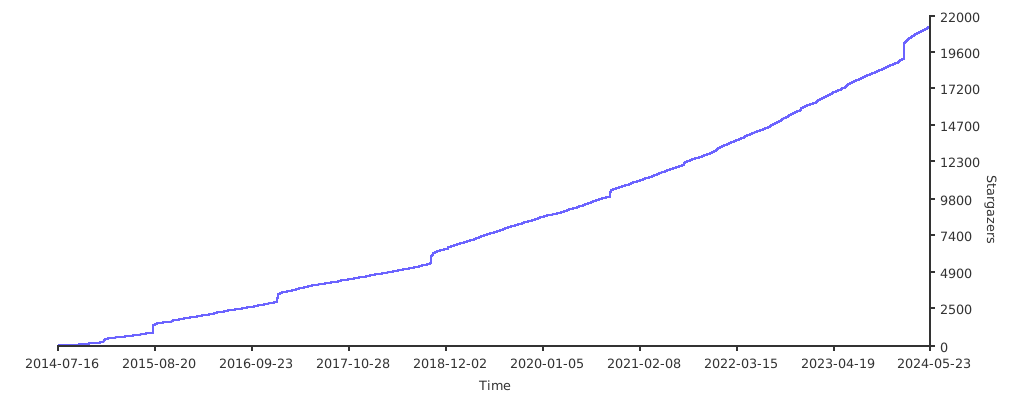
Stargazers over time